
TL;DR
- Autonomous AI agents replace brittle Zapier/Make workflows by handling unstructured client inputs and self-correcting when formats change.
- Best agency use cases: weekly reporting, Drive/file organization, inbox triage + follow-ups, and CRM hygiene/competitor research.
- Evaluate platforms on always-on execution, multi-client memory with data isolation, native integrations (Google/Slack/CRM/1Password), and security/governance.
- Start with a 3-phase rollout: sandbox (read/draft-only) → human approval → full autonomy for low-risk internal tasks.
- ROI depends on the hours saved per account manager, the cost per automated report, and the reduced churn from missed follow-ups.
- Managed hosting is the fastest path to production-ready autonomous agents if you don't want to own servers, updates, and OAuth wrangling yourself.
In 2026, leading agencies are swapping out brittle Zapier workflows and junior admin headcount for always-on, autonomous AI agents. These systems handle reporting, CRM hygiene, and inbox triage around the clock. They shift operations from rigid data routing to adaptive execution, freeing agencies to redirect admin budgets to strategy.
Here's the traditional agency bottleneck: you hire junior staff to wrangle client folders, triage chaotic inboxes, and copy-paste reporting data. It kills profitability. It kills your ability to grow.
This playbook is for agency owners, operations directors, and RevOps leaders who manage ten or more client accounts and want to evaluate and deploy agency-ready AI agents. You'll learn how to move beyond static automations, calculate the new unit economics, and identify which platforms are production-ready for secure, multi-client operations today.
---
Why agency client ops break at scale in 2026
The core problem isn't that manual work is slow. It's that the math breaks when every five new clients require a new junior operations hire. When headcount scales linearly with client acquisition, your margins degrade.
Agencies have tried bridging this gap with legacy automation. But these solutions expose a real weakness: workflow brittleness.
Stitched-together Zapier or Make sequences run on strict, deterministic logic. They work fine until a client changes a report format, sends unstructured data over Slack, or modifies a file. For instance, renaming, adding, or rearranging columns in a Google Sheet will cause the data to mismatch the Zap's expected structure. The moment that happens, the automation fails silently or requires engineers to intervene immediately.
Meanwhile, your account managers face compounding productivity drag. Context-switching across dozens of client Slack channels, fragmented Google Drives, and disparate ad platforms creates massive hidden operational debt.
Microsoft 365 Telemetry data shows that employees experience interruptions every two minutes during core work hours. They're spending hours toggling between tabs instead of doing strategic work.
The 2026 baseline has shifted. Agencies that still staff linearly with client count face a structural margin problem; agencies that redirect admin spend into always-on AI agents can invest that capacity in strategy and creative, the work that actually commands retainer pricing.
---
RPA vs. AI copilots vs. Autonomous AI agents: which works for agency ops?
Understanding the modern automation spectrum is important when evaluating tools.
Short answer: RPA breaks on unstructured client data, copilots can't run unattended, and autonomous agents are the only category built for always-on client ops. Here's why.
Legacy RPA: where it fits and where it breaks for agencies
RPA was built for strict, repetitive enterprise tasks. It relies on predetermined user interface paths and structured data. That makes it too rigid for the messy, unstructured client data that defines agency life, with fragmented emails, loose PDFs, and vague Slack requests.
AI copilots (ChatGPT/Claude): why they don't scale client operations
Copilots represent a massive leap in reasoning, but they don't work as scalable replacements for operations. A copilot is designed for interactive, human-driven sessions. Without additional infrastructure to handle scheduling, memory, and tool execution, they assist daily work, but can’t replace operations.
Autonomous AI agents: what makes them production-ready for client ops
Autonomous agents represent the real shift. These systems run twenty-four hours a day in the background, unattended. They have persistent memory across multiple client projects and execute complex, multi-step workflows across native tools on their own.
The deeper change is moving from deterministic if/then logic to probabilistic execution. If a client sends data in the wrong format, an autonomous agent infers the intent, reformats the data, and continues the workflow without breaking. Instead of failing when an unexpected input arrives, the agent uses semantic understanding to adjust its approach. This reduces the maintenance overhead that plagues traditional workflow builders.
---
Which agency workflows should AI agents own end-to-end?
Recurring client reporting and analytics
Agents autonomously pull data from native platforms like Meta, Google Analytics, and HubSpot. Instead of dumping numbers into a spreadsheet, they reconcile data discrepancies and draft contextual narrative summaries for client review.
Consider how legacy tools fail here. If a static Make scenario encounters a missing client UTM parameter or API restrictions, the entire workflow fails. For example, the Meta Marketing API enforces strict rate limits (e.g., 190,000 calls + 400 * active ads per hour for standard access) and returns limited reach data with breakdowns to a 13-month lookback window.
An autonomous agent handles this gracefully. It can implement exponential backoff for API rate limits, dynamically adjust query parameters within API constraints, or flag missing UTM parameters in a drafted report summary delivered directly to the account team in Slack.
For example, the agent posts in your team's Slack channel: "Acme Corp's Week 17 performance summary is drafted. Heads up, the utm_campaign parameter on the spring promo landing page is missing, so 14% of paid traffic couldn't be attributed. Approve to send to client, or reply with edits." Your account manager either clicks approve or corrects the draft, and the agent handles delivery.
File and Google Drive organization across client accounts
Agencies drown in disorganized client assets. Autonomous agents automate the ingestion of messy files dropped into shared Google Drive or Dropbox environments.
They scan document contents using document parsing tools and vision models, as needed for scanned files, extract key information, standardize naming conventions according to your agency rules, and route assets to the appropriate creative or operations folders.
This workflow directly addresses the "where did the client put that asset?" bottleneck, saving hours of manual searching each week.
Inbox triage and client follow-ups (email and Slack)
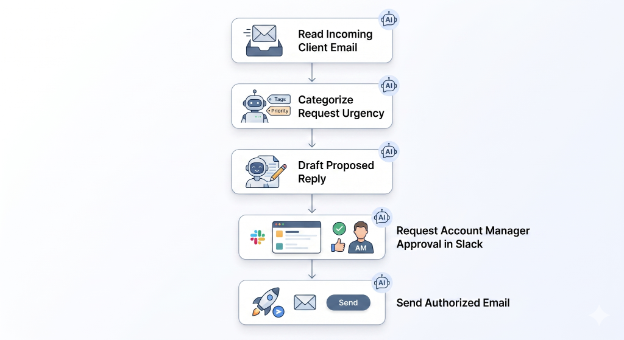
An agent monitors incoming client emails and Slack messages, reads the contents, and categorizes them by urgency. It drafts proposed replies based on historical context and pings the assigned account manager for approval before sending.
Operations directors can also set up scheduled checks, ensuring no client query goes unanswered for more than twenty-four hours. This prevents clients from churning because of poor communication.
By parsing the intent behind a client's message, whether a routine billing question or an urgent creative revision, the agent routes the work to the correct department immediately.
Competitor research and CRM hygiene (HubSpot and Salesforce)
Sales teams traditionally spend a large percentage of their time on CRM data entry. Delegating this to an agent eliminates the friction of updating contact records or logging research notes.
Agents execute autonomous web searches using tools like Brave Search API to monitor client competitors. They synthesize industry news, track pricing changes, and update HubSpot or Salesforce records directly.
This keeps CRM data clean and account managers briefed on competitor movements without manual data entry.
---
Best AI automation platforms for agencies in 2026 (comparison)
Choosing the right platform is critical. A true agency-ready agent isn't just about automating tasks. It's about providing a secure, scalable, and reliable operational backbone.
We evaluate platforms across four core criteria:
- Always-on execution: The platform must run twenty-four hours a day via hosted infrastructure. If it requires a human to click, it's a copilot, not an autonomous agent.
- Multi-client memory & context: Agents must remember context across ten to fifty different clients without cross-pollinating sensitive data or requiring you to re-prompt repeatedly.
- Integration breadth: The platform must natively connect to agency staples: Google Workspace, Slack or Discord, CRMs, 1Password for secrets, and web search.
- Security & governance: Requires strict tool allow-listing, data isolation per client, and human-in-the-loop escalation paths for sensitive actions.
| Platform | Always-on execution | Multi-client memory | Integration breadth | Security & governance | Compliance | Set up/devops burden | Price model |
|---|---|---|---|---|---|---|---|
| Zapier AI | Yes | Low | Very High | Enterprise controls | GDPR (Not HIPAA) | Low | Per-task (Expensive at scale) |
| Make | Yes | Low | High | Team/org roles | GDPR (Not HIPAA) | Medium | Per-operation |
| Gumloop | Yes | Medium | High | RBAC, VPC | SOC 2 Type II, GDPR | Low | Credit-based |
| Lindy | Yes | Medium | High | SSO, Audit logs | SOC 2 Type II, HIPAA, GDPR | Low | Seat-based |
| n8n | Yes | Medium | High | Depends on the hosting model | Deployment dependent | High | Per-execution |
| OpenClaw | Yes | High | High | User-managed | User-managed | Very High | Free OSS + Infra costs |
Workflow builders (Gumloop, Lindy): best for lightweight agency automations
These platforms are well-suited for non-technical users running simple, personal AI automations or visual node-based scraping. But their limitations show up at scale. They don't maintain complex, persistent multi-client memory or enforce the strict enterprise data isolation you need when managing competing accounts securely.
Zapier AI and Make: where deterministic workflows still fit
Zapier and Make have unbeatable integration libraries and work well for strict, linear API data routing. Their limitation is brittleness when unstructured client data changes unexpectedly.
And the Zapier tax compounds heavily. If an agency exceeds its standard limit, tasks are billed at a premium rate, with overages costing 1.25x the base task rate. That makes large-scale operations cost-prohibitive.
Crucially, for agencies managing healthcare or dental clients, Zapier isn't HIPAA-compliant. This severely limits its use cases for handling sensitive data. Make has extended into the agentic space with its Make AI Agents beta feature, signaling a shift from pure integration to more intelligent orchestration. But Make still relies heavily on deterministic frameworks.
Self-hosted automation (n8n, OpenClaw): trade-offs for agency teams
These options offer the most power and capability for technical teams. OpenClaw is a leading open-source agent runtime built for autonomous, multi-tool deployments.
The limitation is operational cost. Self-hosting requires heavy DevOps, virtual private server management, Docker configuration, and constant OAuth wrangling. For agency operations directors focused on client delivery, the DevOps overhead is a non-starter, every hour spent on server maintenance is an hour not spent on billable work.
Managed OpenClaw hosting: production-ready agents without DevOps
If you want the capability of an open-source agent runtime without owning the infrastructure, managed OpenClaw hosting is the middle path. A managed host runs the agent always-on, handles updates and credential vaulting, and replaces raw config files with guided OAuth flows, so an agency can go from zero to an integrated agent in minutes instead of days.
When comparing providers, weigh the same criteria as above: secrets handling (ideally via a vault integration like 1Password so raw credentials never reach the agent or the LLM), strict tool allow-listing, per-client data isolation, model routing flexibility, and how token usage is billed on top of the hosting fee. For a side-by-side of the current options, see our comparison of managed OpenClaw hosting.
---
How to calculate TCO and ROI for AI agents in an agency
To build a business case for AI agents, you need to rethink your operational math.
TCO comparison: junior ops hire vs. managed AI agent
According to the U.S. Bureau of Labor Statistics, the fully loaded cost for a private industry employee averaged $46.15 per hour in late 2025. That translates to over $96,000 annually in fully loaded employment costs.
When you factor in benefits, software seats, training, and management overhead, relying on human capital for pure data entry becomes financially inefficient.
Now compare that to an AI agent.
Managed agent hosting is typically a flat monthly subscription plus pass-through model costs, so your agent hosting is a fixed line item and compute scales with actual usage.
When you use models efficiently, compute costs remain minimal compared to the value of 24/7 availability. For context, OpenAI's GPT-5.4 costs $2.5 per 1M input tokens and $15.00 per 1M output tokens.
Hidden savings: churn reduction, fewer overages, less onboarding
The direct labor comparison understates the savings. Missed follow-ups are a leading cause of account churn; automating response SLAs directly protects retention revenue. Moving to token-based API pricing eliminates those ruinous per-task Zapier overages.
And honestly, relying on agents removes the endless onboarding and training cycle when junior staff frequently turn over.
ROI metrics to track for agency automation
The core ROI metrics to track during deployment are the cost per automated client report and the aggregate hours saved per account manager per week.
---
How to implement AI agents in an agency (phased rollout)
Phase 1 (days 1–14): audit workflows and sandbox the agent
Start by identifying the most rigid, high-volume repetitive tasks in your agency. Standardizing weekly reporting data or sorting messy Google Drive files are perfect initial candidates.
During this phase, run the agent strictly in read-only or draft-only mode. Monitor its logic, tool selection, and outputs internally without granting it any live client visibility.
This sandboxing ensures you understand exactly how the agent parses your unique data structures.
Phase 2 (days 15–45): run human-in-the-loop approvals
Once the agent demonstrates its reasoning capabilities, connect it to your communication channels, such as Slack or Discord.
Implement a human-in-the-loop architecture where the agent must ping the account manager for explicit approval before sending client emails or updating live CRM records.
Use this phase to build a correction log. Manually correct the agent when it encounters edge cases, such as a heavily stylized, unreadable client PDF. This measured approach ensures operations directors can manage change effectively, proving value to the wider team before full deployment.
Phase 3 (day 45+): scale autonomous workflows safely
After the agent demonstrates consistent, accurate outputs across two to three weeks of supervised operation, remove the approval bottleneck for low-risk, internal tasks. Folder organization, internal meeting summaries, and competitor research can run unattended.
Roll out this tested architecture across all client accounts. Use isolated agent instances or strict contextual tagging to ensure client data remains securely separated.
---
Agency AI agent FAQs
What is the difference between an AI agent and Zapier or Make?
Zapier/Make runs deterministic if/then workflows that break when inputs change. AI agents use LLM reasoning to handle unstructured requests (emails, PDFs, Slack) and can adapt, reformat, and continue autonomously with human approval gates in place for external communication until trust is established.
Is client data safe with AI agents?
Client data can remain safe if the platform supports per-client data isolation, tool allow-listing, secrets management (e.g., 1Password), and audit logs + human-in-the-loop approvals for sensitive actions.
Are you locked into OpenAI when using AI agents?
No. Many agent platforms support routing across multiple model providers so you can choose models by task (cost, speed, quality) and avoid vendor lock-in.
What agency tasks should we automate first with AI agents?
Start with high-volume, low-risk workflows: draft weekly reports, inbox categorization + reply drafts, file naming/routing, and CRM enrichment. Then expand to actions that write/send only after approvals.
How do AI agents handle multiple clients without mixing data?
Use separate client workspaces/instances (or strict tenant tagging). Modern vector databases like Pinecone achieve this through namespaces, scoped credentials per client, and policies that prevent cross-client retrieval or tool access.
Do AI agents require human approval before sending emails or updating the CRM?
In production rollouts, best practice is human-in-the-loop by default for external communications and CRM updates. As the agent demonstrates consistent, accurate outputs, approvals can be removed for proven low-risk internal tasks, such as folder organization and meeting summaries.
How long does it take to implement an AI agent for agency ops?
A basic pilot can be set up in days. But a reliable rollout typically follows a phased approach: 2 weeks of sandboxing, 2–4 weeks of human-in-the-loop, then broader automation after performance is validated.
How do we measure ROI for AI agents in an agency?
Track hours saved per account manager, cost per automated report, time-to-response for client requests, and reductions in churn caused by missed follow-ups.
Are AI agents HIPAA/SOC 2 compliant for healthcare or dental clients?
Compliance depends on the platform and your configuration. Confirm SOC 2 status, HIPAA support/BAA availability, data retention policies, and audit logging before handling regulated data.
What's the biggest risk when deploying AI agents in client operations?
The main risk is uncontrolled actions, such as sending incorrect emails or entering incorrect CRM data. Mitigate with approval gates, tool restrictions, logging, and starting in draft-only mode.
---
Conclusion: scale client ops without adding headcount
The winning agencies of 2026 aren't scaling by hiring more data-entry staff. They protect their margins and accelerate their output by deploying managed AI agents to handle the operational baseline.
When evaluating your transition to an agentic workforce, remember that choosing the right infrastructure matters more than picking a flashy user interface. You need systems that guarantee always-on availability, secure data isolation, and multi-model flexibility.
If you want the power of open-source autonomous agents without the DevOps burden or the virtual private server nightmare, consider a managed OpenClaw host instead of running the infrastructure yourself: see our comparison of managed OpenClaw hosting options.
For development teams scaling AI-powered coding workflows alongside agency ops, explore Kilo for Teams or Cloud Agents for autonomous background tasks.