Using OpenAI Compatible Providers With Kilo Code
Kilo Code supports a wide range of AI model providers that offer APIs compatible with the OpenAI API standard. This means you can use models from providers other than OpenAI, while still using a familiar API interface. This includes providers like:
- Local models running through tools like Ollama and LM Studio (covered in separate sections).
- Cloud providers like Perplexity, Together AI, Anyscale, and others.
- Any other provider offering an OpenAI-compatible API endpoint.
This document focuses on setting up providers other than the official OpenAI API (which has its own dedicated configuration page).
Do not use a custom OpenAI-compatible provider for Azure OpenAI GPT-5 deployments. Azure GPT-5 rejects the max_tokens parameter used by generic OpenAI-compatible providers and requires Azure-specific handling.
Use Kilo Code's native azure provider instead. If your Azure deployment name differs from the model name you select in Kilo, map it with the model id field in kilo.json.
General Configuration
- Open Settings (gear icon) and go to the Providers tab.
- Scroll to the bottom and click Custom provider.

- Fill in the custom provider dialog:
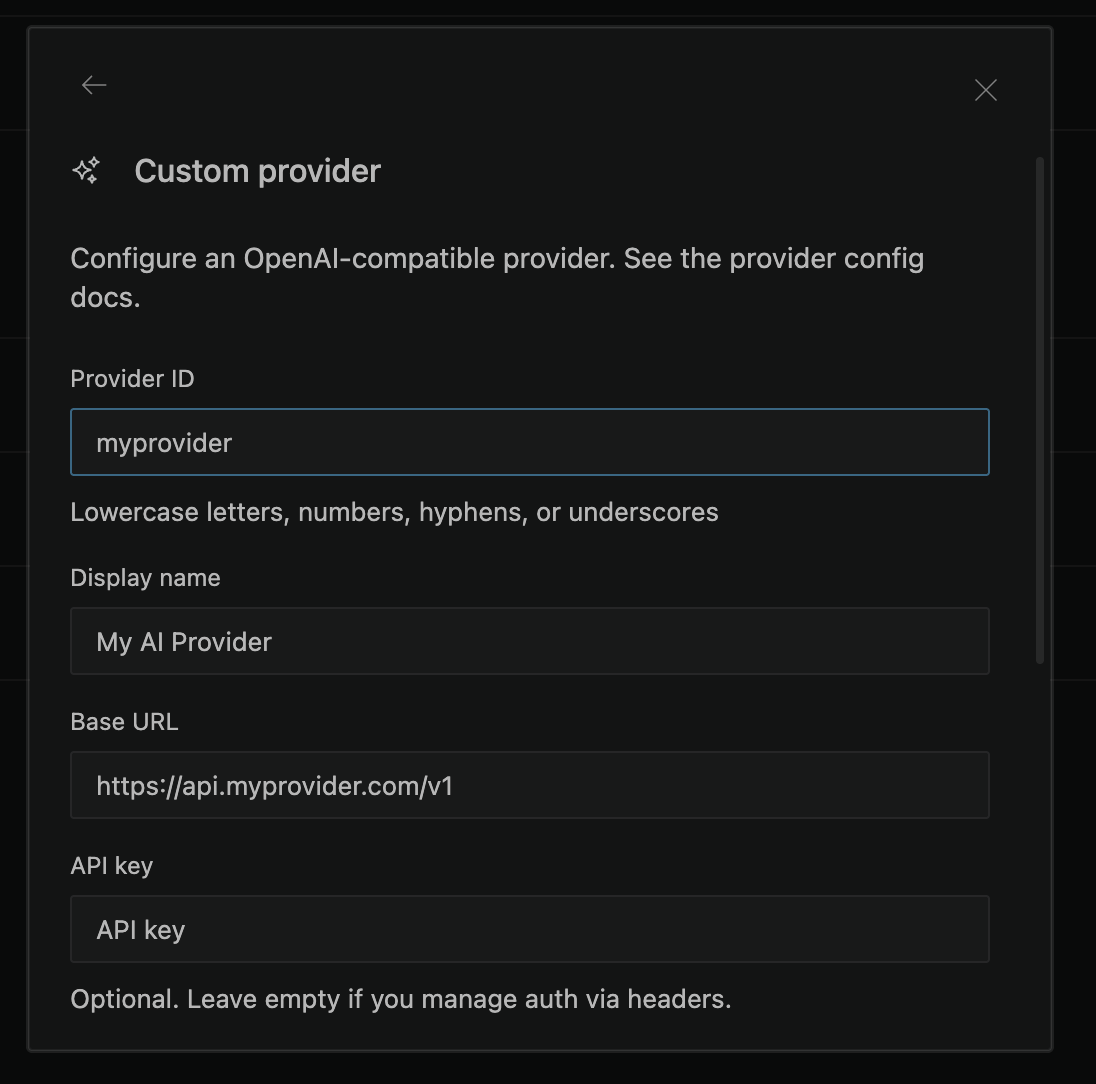
- Provider ID — A unique identifier (e.g.,
my-provider). - Display name — A human-readable name shown in the UI.
- Provider API — Select OpenAI Compatible for an OpenAI Chat Completions-compatible endpoint. Use OpenAI Responses for OpenAI and xAI models. Use Anthropic Messages for Anthropic and MiniMax models.
- Base URL — The provider's API endpoint (e.g.,
https://api.your-provider.com/v1). Kilo auto-fetches available models when a valid URL exposes an OpenAI-compatible models endpoint. For Azure OpenAI GPT-5, use the nativeazureprovider instead. - API key — Your API key. Optional — leave empty if authentication is handled via headers.
- Models — Add models manually or select from the auto-fetched list (see Automatic Model Detection below).
- Headers (optional) — Custom HTTP headers as key-value pairs.
- Click Submit to save. The provider's models appear in the model picker.
For additional model configuration (token limits, tool calling, variants), edit the kilo.jsonc config file directly — see the CLI tab or the Custom Models guide.
Automatic Model Detection
When configuring a custom OpenAI-compatible provider, Kilo Code can automatically detect available models from your provider's /v1/models endpoint.
Once you enter a valid Base URL and API Key, Kilo Code will query the provider and present a searchable model picker with all available models. You can:
- Search with fuzzy matching (e.g., typing "gpt4o" finds "gpt-4o-mini")
- Select individual models to add to the provider configuration
- Edit an existing custom provider to add or remove models later
This eliminates the need to manually look up and type model IDs. If auto-detection fails (for example, if the provider doesn't support the /v1/models endpoint), you can still enter model IDs manually.
Click Fetch models next to the model list to retry the fetch at any time, for example after fixing the base URL or API key.
Full Endpoint URL Support
Kilo Code supports full endpoint URLs in the Base URL field, providing greater flexibility for provider configuration:
Standard Base URL Format:
https://api.provider.com/v1
Full Endpoint URL Format:
https://api.provider.com/v1/chat/completions
https://custom-endpoint.provider.com/api/v2/models/chat
This enhancement allows you to:
- Connect to providers with non-standard endpoint structures
- Use custom API gateways or proxy services
- Work with providers that require specific endpoint paths
- Integrate with enterprise or self-hosted API deployments
Note: When using full endpoint URLs, ensure the URL points to the correct chat completions endpoint for your provider.
Troubleshooting
- "Invalid API Key": Double-check that you've entered the API key correctly.
- "Model Not Found": Make sure you're using a valid model ID for your chosen provider.
- Connection Errors: Verify the Base URL is correct and that your provider's API is accessible.
- Azure GPT-5 rejects
max_tokens: Azure GPT-5 deployments must use Kilo Code's nativeazureprovider. Generic OpenAI-compatible custom providers sendmax_tokens, which Azure GPT-5 rejects because it expectsmax_completion_tokens. - Unexpected Results: If you're getting unexpected results, try a different model.
By using an OpenAI-compatible provider, you can leverage the flexibility of Kilo Code with a wider range of AI models. Remember to always consult your provider's documentation for the most accurate and up-to-date information.