Custom Models
Kilo Code ships with a curated list of models for each provider, but you can use any model your provider supports — including models that aren't in the built-in list. This is useful for:
- Using a newly released model before it's added to the built-in catalog
- Running a custom or fine-tuned model via LM Studio, Ollama, or another local provider
- Connecting to a self-hosted model through a custom API endpoint
- Configuring model-specific options like token limits, pricing, or reasoning settings
Defining a Custom Model
Add custom models under the provider.<provider_id>.models key in your config file. The model key becomes the model ID you reference elsewhere.
Open Settings (gear icon) and go to the Providers tab.
Scroll to the bottom of the provider list and click Custom provider.

- Fill in the custom provider dialog:
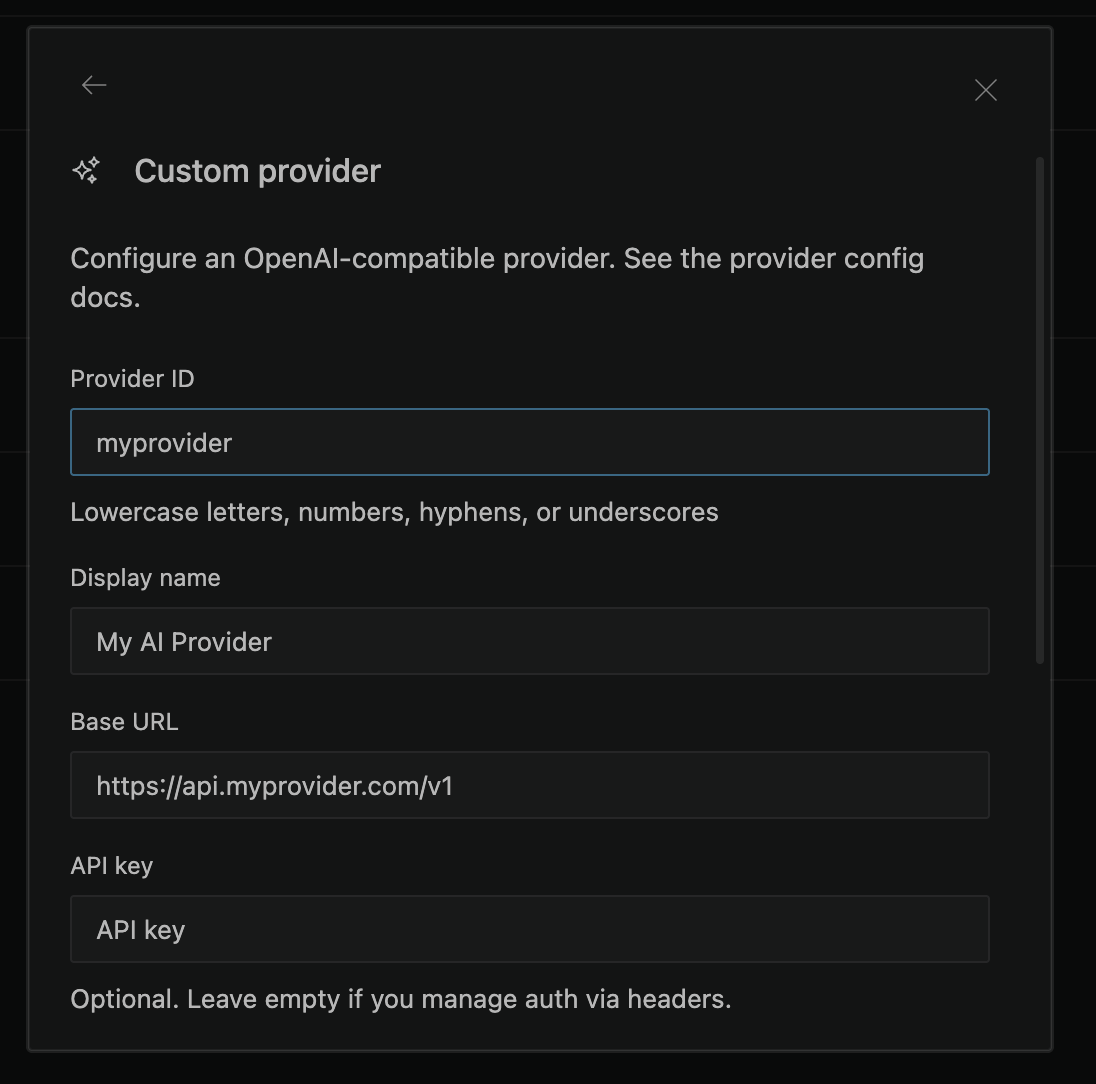
- Provider ID — A unique identifier using lowercase letters, numbers, hyphens, or underscores (e.g.,
myprovider). This becomes theprovider_idin theprovider_id/model_idformat. - Display name — A human-readable name shown in the UI (e.g.,
My AI Provider). - Provider API — The protocol used by the provider. Use OpenAI Responses for OpenAI and xAI models. Use Anthropic Messages for Anthropic and MiniMax models. OpenAI Compatible is the default for other OpenAI Chat Completions-compatible endpoints.
- Base URL — The provider's API endpoint (e.g.,
https://api.myprovider.com/v1). When a valid URL is entered, Kilo automatically fetches available models from the endpoint if it exposes an OpenAI-compatible models endpoint. - API key — Your provider's API key. Optional — leave empty if you manage authentication via headers.
- Models — Add models manually by ID and display name, or select from the auto-fetched list that appears after entering a valid base URL. Click Fetch models to trigger the fetch on demand, for example after the automatic fetch failed or the endpoint requires extra setup.
- Headers (optional) — Add custom HTTP headers as key-value pairs if your provider requires them.
- Click Submit to save. Your custom provider appears in the provider list and its models become available in the model picker.
To edit an existing custom provider, click the Edit provider button next to it in the connected providers section.
For additional model configuration (token limits, tool calling, reasoning, variants), edit the kilo.jsonc config file directly — see the CLI tab for the format.
The model key uses the format provider_id/model_id, where:
provider_idis the key underprovider(e.g.,lmstudio,ollama,openai,anthropic,openai-compatible)model_idis the key underprovider.<provider_id>.models(e.g.,my-custom-model)
Model Configuration Fields
All fields are optional. When a model ID matches one already in the built-in catalog, your values are merged on top of the defaults — you only need to specify what you want to override.
| Field | Type | Description |
|---|---|---|
name | string | Display name shown in the model picker |
id | string | API-facing model ID sent to the provider. Defaults to the config key |
tool_call | boolean | Whether the model supports tool/function calling |
reasoning | boolean | Whether the model supports extended thinking |
temperature | boolean | Whether the model supports the temperature parameter |
attachment | boolean | Whether the model supports file attachments |
modalities | object | Optional. Supported input and output types: { input, output } |
limit | object | Token limits: { context, output, input? } |
cost | object | Pricing per million tokens: { input, output, cache_read?, cache_write? } |
options | object | Arbitrary provider-specific model options |
headers | object | Custom HTTP headers to include in requests |
provider | object | Override { npm?, api? } — the AI SDK package or base API URL for this model |
variants | object | Named variant configurations (e.g., different reasoning efforts) |
Modalities (modalities)
The modalities object declares which content types the model can receive and produce. It is optional — omit it to use defaults from the catalog or fallback to text-only. When modalities is provided, both input and output arrays are required. Each array can include text, image, audio, video, or pdf.
| Sub-field | Type | Required | Description |
|---|---|---|---|
input | array | Yes (if present) | Content types the model accepts from the user |
output | array | Yes (if present) | Content types the model can generate in response |
For a standard text model that can also inspect images, use:
"modalities": {
  "input": ["text", "image"],
  "output": ["text"]
}
If modalities is omitted and the model ID matches a models.dev catalog entry for that provider, Kilo uses the catalog's modalities. For completely custom models with no catalog match, Kilo defaults to text input and text output only. Set attachment: true alongside image, audio, video, or PDF input modalities when the provider supports sending those files as attachments.
Token Limits (limit)
The limit object controls how Kilo manages the model's context window and output length. These values are specified in tokens.
| Sub-field | Type | Required | Description |
|---|---|---|---|
context | number | No | The model's total context window size (e.g., 131072 for a 128K model). Used to determine when conversation history should be compacted to stay within the window. |
output | number | No | The maximum number of tokens the model can generate in a single response. Sent to the provider as max_tokens or equivalent. Capped at 32,000 by default. |
input | number | No | An optional stricter input limit. Some providers enforce an input token ceiling that is lower than the full context window. When set, compaction triggers against this value instead of context. |
"limit": {
  "context": 131072,
  "output": 16384
}
If a model stops because it reaches limit.output, Kilo shows a visible warning that the response may be incomplete. For reasoning models that spend the whole response reasoning and produce no text or tool call, the warning suggests disabling reasoning or increasing limit.output.
How limits are resolved
Kilo resolves token limits in this order:
- Your config — values you set under
provider.<id>.models.<model>.limit - Built-in catalog — Kilo ships a snapshot of models.dev and refreshes it hourly. If your model ID matches a known model, catalog values are used as defaults.
- Fallback — if neither source provides a value,
contextandoutputdefault to0.
What happens when limits are 0
If you use a custom or local model and don't specify limits — and the model isn't in the built-in catalog — both context and output resolve to 0. This has meaningful side effects:
- Compaction is disabled. Kilo uses
contextto detect when the conversation exceeds the model's window and needs to be summarized. Withcontext: 0, overflow detection is skipped and conversations will grow unbounded until the provider rejects the request. - Output falls back to 32,000 tokens. When
outputis0, Kilo uses its internal default of 32,000 tokens (configurable via theKILO_EXPERIMENTAL_OUTPUT_TOKEN_MAXenvironment variable). - No context usage tracking. Usage metrics that depend on knowing the context size are skipped.
For custom and local models, always set limit.context and limit.output to match the model's actual capabilities. Without these values, automatic context management is disabled.
Examples
Local model with LM Studio
Register a model that LM Studio serves under a custom name:
{
  "$schema": "https://app.kilo.ai/config.json",
  "model": "lmstudio/deepseek-r1-0528",
  "provider": {
    "lmstudio": {
      "models": {
        "deepseek-r1-0528": {
          "name": "DeepSeek R1 0528",
        },
      },
    },
  },
}
Local model with Ollama
{
  "$schema": "https://app.kilo.ai/config.json",
  "model": "ollama/my-finetune:latest",
  "provider": {
    "ollama": {
      "models": {
        "my-finetune:latest": {
          "name": "My Fine-tuned Model",
          "tool_call": true,
          "limit": {
            "context": 32768,
            "output": 8192,
          },
        },
      },
    },
  },
}
New or unlisted model from a cloud provider
Use a model that's not yet in the built-in catalog:
{
  "$schema": "https://app.kilo.ai/config.json",
  "model": "openai/gpt-6-preview",
  "provider": {
    "openai": {
      "models": {
        "gpt-6-preview": {
          "name": "GPT-6 Preview",
          "tool_call": true,
          "reasoning": true,
          "limit": {
            "context": 200000,
            "output": 32768,
          },
        },
      },
    },
  },
}
OpenAI-compatible provider with a custom endpoint
Connect to any provider that exposes an OpenAI-compatible API:
{
  "$schema": "https://app.kilo.ai/config.json",
  "model": "openai-compatible/my-model",
  "provider": {
    "openai-compatible": {
      "options": {
        "apiKey": "{env:MY_PROVIDER_API_KEY}",
        "baseURL": "https://api.my-provider.com/v1",
      },
      "models": {
        "my-model": {
          "name": "My Custom Model",
          "tool_call": true,
          "limit": {
            "context": 128000,
            "output": 16384,
          },
        },
      },
    },
  },
}
Configuring model options and variants
Override options or define reasoning variants for a built-in model. Variant fields are provider-specific and are merged into the request when you select that variant.
{
  "$schema": "https://app.kilo.ai/config.json",
  "provider": {
    "anthropic": {
      "models": {
        "claude-sonnet-4-20250514": {
          "options": {
            "thinking": {
              "type": "enabled",
              "budgetTokens": 16000,
            },
          },
          "variants": {
            "thinking-high": {
              "thinking": {
                "type": "enabled",
                "budgetTokens": 32000,
              },
            },
            "fast": {
              "disabled": true,
            },
          },
        },
      },
    },
  },
}
MiniMax's OpenAI-compatible Chat Completions API supports the optional boolean reasoning_split field. Set it on the relevant variant to control how the API returns thinking content:
"variants": {
  "thinking": {
    "reasoning_split": true,
  },
}
With true, MiniMax returns thinking separately in reasoning_content and reasoning_details. This setting changes only the response format, not whether the model thinks. Leave it unset for providers that do not support it, including MiniMax using the Anthropic Messages API.
Using the id field to map model names
If the model key in your config differs from what the provider expects, use the id field:
{
  "$schema": "https://app.kilo.ai/config.json",
  "model": "lmstudio/my-local-llama",
  "provider": {
    "lmstudio": {
      "models": {
        "my-local-llama": {
          "id": "meta-llama-3.1-8b-instruct",
          "name": "Llama 3.1 8B (Local)",
        },
      },
    },
  },
}
Here my-local-llama is the key you use in your config and model picker, while meta-llama-3.1-8b-instruct is the actual model identifier sent to the LM Studio API.
For Azure OpenAI, use the native azure provider and set id to your Azure deployment name when it differs from the model key. Do not configure Azure GPT-5 family deployments under openai-compatible, because that provider sends max_tokens and Azure GPT-5 expects max_completion_tokens.
{
  "$schema": "https://app.kilo.ai/config.json",
  "model": "azure/gpt-5.5",
  "provider": {
    "azure": {
      "options": {
        "apiKey": "{env:AZURE_API_KEY}",
        "resourceName": "my-azure-resource",
      },
      "models": {
        "gpt-5.5": {
          "id": "my-gpt-5-5-deployment",
          "name": "GPT-5.5 on Azure",
          "reasoning": true,
          "tool_call": true,
          "temperature": false,
          "limit": {
            "context": 400000,
            "output": 128000,
          },
        },
      },
    },
  },
}
Here azure/gpt-5.5 is the model you select in Kilo Code, while my-gpt-5-5-deployment is the Azure deployment name sent to Azure. If you prefer to configure the full Azure endpoint instead of a resource name, replace resourceName with baseURL, for example "baseURL": "https://my-resource.openai.azure.com/openai". If both are configured, Kilo Code uses baseURL and ignores resourceName to avoid sending conflicting Azure SDK options.
Model Loading Priority
When Kilo starts, it resolves the active model in this order:
- The
--model(or-m) command-line flag - The
modelkey in your config file - The last used model from your previous session
- The first available model using an internal priority
The format for all of these is provider_id/model_id.
Provider-Level Options
You can also set options that apply to all models from a provider:
{
  "provider": {
    "openai": {
      "options": {
        "apiKey": "{env:OPENAI_API_KEY}",
        "baseURL": "https://my-proxy.example.com/v1",
        "timeout": 300000,
      },
    },
  },
}
| Option | Type | Description |
|---|---|---|
apiKey | string | API key (supports {env:VAR} and {file:...} syntax in trusted config — see note below) |
baseURL | string | Override the provider's base API URL |
timeout | number | false | Request timeout in milliseconds, covering both the wait for response headers and the wait for the first byte of the response body. Defaults to 300000 (5 minutes); set to false to disable. Once data starts arriving the timeout no longer applies, so slow streaming responses are never cut short — use chunkTimeout for gaps inside a response |
chunkTimeout | number | Timeout in milliseconds between streamed response chunks. If no chunk arrives within this window, the request is aborted and retried. This catches silent provider dropouts where the TCP connection stays open but SSE streaming stops. Recommended: 15000–30000 (15–30 seconds) for providers with unreliable streaming. |
{env:VAR} and {file:...} references in apiKey (or any option) are resolved only when the config lives in a trusted location: your global config (~/.config/kilo), a config passed via KILO_CONFIG / KILO_CONFIG_CONTENT, or organization/MDM-managed config. A project-level kilo.json / opencode.json committed to a repository cannot resolve {env:VAR} — the reference is ignored and a warning is logged, so a provider configured this way in a repo will not authenticate. This prevents a malicious repository from exfiltrating your secrets to an attacker-controlled baseURL just by being opened. {file:...} still works in project config, but only for files that resolve inside the project root — references that leave it (absolute paths outside the root, ../ traversal, and symlink escapes) are rejected. Keep provider credentials in your global config.
Filtering Available Models
Control which models appear in the model picker for a provider using allowlists and blocklists:
{
  "provider": {
    "openai": {
      "whitelist": ["gpt-5", "gpt-5-mini"],
      "blacklist": ["gpt-4-turbo"],
    },
  },
}
whitelist— only these model IDs are available from this providerblacklist— these model IDs are hidden from this provider
Troubleshooting
Model doesn't appear in the model picker:
- Verify the provider has valid credentials configured (API key, or local server running)
- Check that the model key matches what you set in
"model": "provider/model-key" - Run
kilo modelsto list all available models and confirm your provider is active
Model errors or unexpected behavior:
- Set
tool_call: trueif you need the model to use tools (file editing, terminal, etc.) - Set
limit.contextandlimit.outputto match the model's actual capabilities — see Token Limits above for details and defaults - If conversations seem to grow without being compacted, your
limit.contextis likely0(unset) - For local models, ensure your inference server is running and accessible at the configured URL