
Claude Cowork changed how we interact with AI. It proved that an agentic desktop coworker could actually execute multi-step tasks across local applications.
But here's the thing. As organizations scale their AI adoption, the limitations of a strictly local desktop assistant become obvious.
This guide covers eight leading alternatives to Claude Cowork, broken down by local-first versus cloud-hosted architectures. We'll look at their security frameworks, autonomy levels, and deployment realities so you can find what actually fits your operations.
If you're an operations manager, a go-to-market professional, or a technical leader who doesn't have time to babysit servers, this is for you. And if you need true, unattended background automation that keeps working after you close your laptop? There are powerful options built for exactly that.
TL;DR: Best Claude Cowork alternatives (by use case)
For teams evaluating AI agent platforms in 2026, the primary decision is simple: if you need 24/7 unattended execution, go cloud-hosted. Local-first tools stop when your laptop sleeps.
- Best for zero-DevOps, secure always-on automation: managed OpenClaw hosting requires no server management and delivers 24/7 autonomous background execution with enterprise security.
- Best for visual, enterprise workflow automation: Gumloop provides a node-based canvas for revenue operations teams, focusing on structured execution, role-based access control, and robust enterprise collaboration.
- Best for leveraging an existing app ecosystem: Zapier Central connects a natural language conversational interface to an unparalleled library of 8,000+ business applications. Ideal if you're already deeply embedded in existing workflows.
- Best for managed multi-model orchestration (no BYOK): Perplexity Computer auto-routes tasks across 19 models with 400+ app integrations, but you can't select models or bring your own keys. Starts at $200 per month.
- Best for developer-heavy, code-generation workflows: Cursor remains the industry standard for deeply technical users requiring integrated, multi-file codebase engineering and repository management.
- Best for self-hosted always-on (DevOps required): OpenClaw offers complete data control and extensibility for technical teams willing to manage servers for 24/7 execution. n8n provides similar extensibility with a managed cloud option if you don't want to self-host.
- Best for local-only privacy (not always-on): Eigent offers an open-source, local-first experience for users who prioritize data privacy over continuous background execution.
- Avoid if you need 24/7: Purely local-first clones are counterproductive if your primary goal is background execution. They inherit the same architectural limitations as Claude Cowork. The moment your laptop screen shuts, all tasks pause.
Why Claude Cowork falls short for always-on agents
Claude Cowork set the initial benchmark for agentic task execution. It runs a sandboxed Linux shell, reads and creates local files, controls the desktop through computer use, supports MCP integrations, and can build reusable skills that grow its capabilities over time. It even offers scheduled tasks and a Dispatch mode that lets it work autonomously while you step away.
That's a capable desktop agent. But its architecture creates real problems for continuous business operations and regulated workflows.
The most critical bottleneck is the open laptop dependency. Claude Cowork processes tasks locally, meaning if your computer goes to sleep or you close the application, all active tasks halt immediately. Cowork does support scheduled tasks and Dispatch mode, but both depend on the host machine staying awake. That makes them unreliable for automated email monitoring, lead enrichment, or any workflow that needs true 24/7 background execution.
Running any agent locally introduces real security risks. A local agent with extensive system access can inadvertently read or leak sensitive API keys if prompted maliciously, exposing critical endpoints. Cowork uses MCP integrations rather than plain-text environment files, but the fundamental risk of an agent operating on your primary workstation remains.
Collaboration creates friction, too. Claude Cowork supports only single-player execution. You can't securely share an active agent's memory, context, or authorized OAuth connections with a remote team member without manually transferring unsecured configuration files.
Finally, relying on Claude Cowork forces strict model lock-in. You're confined to the Anthropic ecosystem and can't route specific tasks to specialized models based on cost or performance.
You can't use a low-cost, high-speed model for basic inbox triage and automatically escalate to a frontier reasoning model for complex financial analysis.
When Claude Cowork is still the right choice
Despite these limitations, Claude Cowork works well for specific scenarios:
- Desktop-bound professionals, including writers, analysts, and developers, who need real-time access to local file systems that can't be uploaded to a cloud repository.
- Desktop automation via computer use for GUI-based applications that lack API endpoints.
- Users who can leverage Dispatch mode and scheduled tasks for hands-off local execution and don't need an always-on, location-independent uptime.
Claude Cowork is available on the Pro plan at $20 per month. Max tiers at $100 per month (5x usage) and $200 per month (20x usage) unlock heavier workloads. Complex, multi-step agentic tasks consume usage faster than standard chat, so heavy Cowork users will likely need a Max tier.
How to choose a Claude Cowork alternative
Selecting an AI agent platform requires moving past generic feature lists and evaluating the structural foundations of each tool.
Architecture: Local-first vs. cloud-hosted agents
This choice forms your foundation. Does the agent run on your local hardware or in a managed cloud environment?
Local-first architectures give you immediate access to your local file system but require continuous uptime and increase your endpoint vulnerability risk. Managed cloud environments run on professionally secured infrastructure, enabling persistent, always-on operations without hardware dependencies.
This architectural decision alone dictates whether an agent can handle unattended automation.
Autonomy and scheduling: Can it run 24/7?
True agents operate without human initiation. Can the tool execute event-triggered workflows, like launching a research protocol when a specific email arrives in a shared inbox?
Check for robust cron scheduling that lets you set recurring tasks, like generating and distributing a comprehensive sales pipeline report every Monday morning, without requiring you to be online or authenticated at execution time.
Security and compliance: How are credentials and actions controlled?
Business data requires enterprise-grade protection. Look at three specific areas:
-
Credential management: How does the platform store API keys and OAuth tokens? Prioritize tools that include native integrations with dedicated secret vaults, like 1Password or HashiCorp Vault, rather than platforms relying on plain-text files stored on your local drive.
-
Execution sandboxing: Where does the agent physically execute its code? An isolated, ephemeral cloud container with strict egress controls offers a drastically reduced blast radius compared to an agent with unrestricted terminal access on your primary workstation.
-
Action approval and auditing: Does the platform have mandatory human-in-the-loop gates? Actions involving financial transactions or external communications should require explicit human authorization. You'll also want comprehensive, exportable audit logs for compliance tracking. Data privacy policies must clearly state whether your inputs train the model, and look for certifications like SOC 2 Type II compliance.
Model choice: Multi-model routing vs. vendor lock-in
Operating efficiently requires dynamic routing. Are you restricted to a single vendor's ecosystem, or does the platform act as an agnostic gateway?
Switching among hundreds of models from providers like OpenAI, Anthropic, Google, and open-source variants lets you continuously optimize your workflows for inference speed, reasoning capability, and token cost.
Memory and state: Does the agent persist context over time?
Does the agent maintain long-term contextual memory and tool state across multiple sessions?
A platform that resets its understanding of your preferences, ongoing projects, and authorized tool states every time the application restarts isn’t an autonomous coworker.
Claude Cowork alternatives comparison (always-on, security, models)
| Alternative name | Architecture | Best for | Model flexibility | Always-on capable | Security posture |
|---|---|---|---|---|---|
| Gumloop | Hosted | Visual enterprise automation | Multi-model | Yes | Enterprise-grade |
| Zapier Central | Hosted | Existing app ecosystem integration | Multi-model | Yes | Enterprise-grade |
| Perplexity Computer | Hosted | Multi-model agentic workflows | Auto-routed only (no BYOK) | Yes | Enterprise-grade (requires Enterprise tier) |
| Cursor | Cloud/Local | AI-first software engineering | Multi-model | Partial | Enterprise-grade |
| n8n | Self-Hosted / Cloud | Extensible developer workflows | Bring your own API | Yes | DIY / Enterprise |
| Eigent | Local | Privacy-focused local users | Bring your own API | No | DIY |
| OpenClaw | Self-Hosted | Custom embedded agent frameworks | Bring your own API | Yes | DIY |
| Open-Source Clones | Local | UI replicas for hobbyists | Bring your own API | No | DIY |
In-depth reviews of Claude Cowork alternatives
Cloud-hosted Claude Cowork alternatives for always-on automation
Cloud-hosted platforms solve the open laptop problem. By executing workflows on remote, managed infrastructure, they provide the foundation for true 24/7, unattended background tasks.
These platforms work best for business operations, revenue teams, and cross-functional collaboration.
-
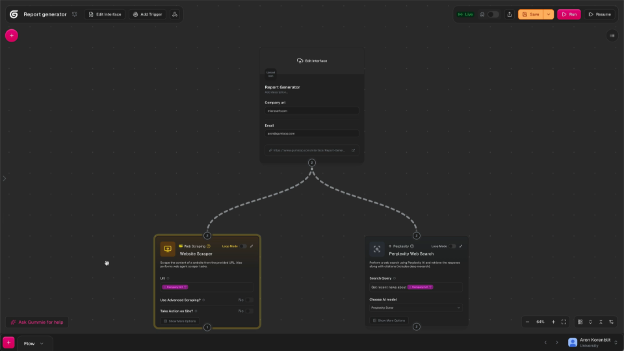
Gumloop (visual workflow automation for teams)
Best for
Revenue operations and marketing teams that prefer visual, node-based workflow builders over purely conversational, chat-driven agent frameworks.
Overview
Gumloop is a visual AI automation platform. You drag and drop specialized AI nodes to construct highly complex, repeatable business workflows.
The platform positions itself as an advanced automation engine, combining the structured logic of traditional integration tools with dynamic language model reasoning.
Key differentiators vs. Claude Cowork
-
Uses a visual canvas approach to define tasks rather than relying entirely on open-ended conversational prompts.
-
Enforces structured and predictable execution pathways built for maximum reliability in revenue-critical workflows.
-
Features deeply integrated enterprise collaboration tools, including centralized credential management and granular role-based access controls.
What you gain
Clear, visual logic mapping, so operations managers can see exactly what the AI will execute at every step. You can securely share workflow templates and manage API credentials across entire departments without exposing plain-text keys.
What you give up
Gumloop requires you to strictly map out the logical pathways and decision trees rather than simply giving the agent a broad goal and letting it figure out the sequence.
It also lacks the conversational fluidity needed for managing ad-hoc, unstructured daily tasks. Unlike Claude Cowork and other hosted alternatives, Gumloop doesn't support two-way messaging through channels like Slack, Telegram, or Discord. You interact with workflows through the dashboard, not through the tools your team already uses.
Pricing
Subscriptions begin at $37 per month for the Pro plan, which includes unlimited seats and higher concurrent run limits.
Migration from Claude Cowork
Moderate. The transition requires a shift in thinking. You'll need to translate your conversational prompts into structured, node-based visual workflows.
-
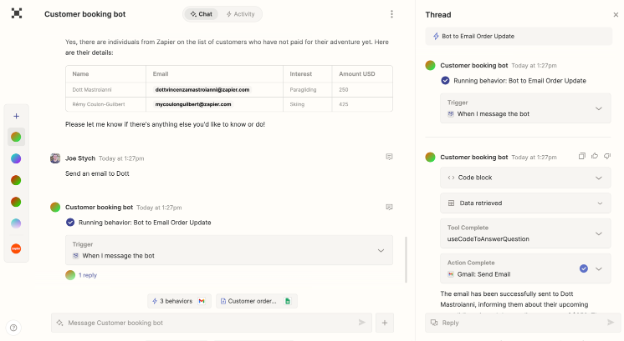
Zapier Central (agents for the Zapier app ecosystem)
Best for
Teams already embedded in the existing Zapier ecosystem who want to attach natural language agentic capabilities to their established automation infrastructure.
Overview
Zapier Central is a dedicated AI workspace where you can build, train, and deploy AI agents via natural language commands, built on top of Zapier's unmatched library of over 8,500 application integrations. Central allows agents to execute intricate tasks across practically any software stack used in modern business.
Key differentiators vs. Claude Cowork
-
Built entirely upon the industry's most extensive, reliable integration ecosystem.
-
Merges a conversational bot-building interface with highly structured data sources and pre-defined software actions.
What you gain
Immediate connectivity to nearly any business application without waiting for custom API integrations. You inherit Zapier’s enterprise-ready security protocols, compliance frameworks, and reliable uptime guarantees.
What you give up
No local file system access, terminal execution, or advanced code generation. While powerful for connecting software, the agentic layer remains more structured and slightly less adaptable to free-roaming, unstructured reasoning tasks compared to specialized framework environments.
Pricing
Access to Zapier Central is bundled within Zapier's higher-tier professional and team subscription plans.
Migration from Claude Cowork
Moderate. You'll authenticate your various applications through Zapier's standard interface and rewrite your Claude Cowork prompts into specific task instructions for Zapier bots.
-
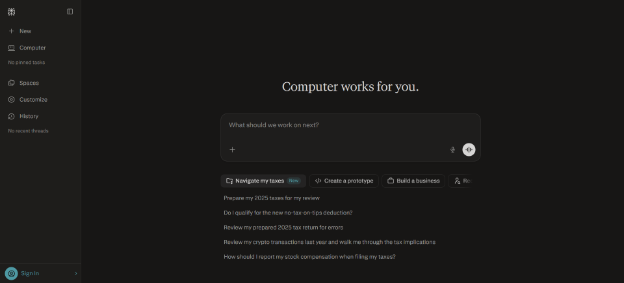
Perplexity Computer (multi-model agentic platform)
Best for
Knowledge workers, operators, and technical teams who want managed multi-model orchestration across research, code generation, and content production without selecting models themselves.
Overview
Perplexity Computer coordinates 19 AI models simultaneously, routing each subtask to the best-suited model automatically. Claude Opus 4.6 handles core reasoning, Gemini manages deep research, and dedicated models cover image generation, video production, and lightweight tasks.
You don't pick the model. Perplexity Computer owns the orchestration layer and makes routing decisions for you.
Key differentiators vs. Claude Cowork
-
Runs every task in an isolated cloud environment with a real filesystem, browser, and native integrations with over 400 applications, including Slack, Gmail, GitHub, and Notion.
-
Coordinates 19 AI models through automatic routing, eliminating manual model selection entirely.
-
Supports two-way messaging across Slack, WhatsApp, Telegram, and Discord, letting you trigger and manage workflows directly from existing communication channels.
-
Can execute workflows that run for hours, generating code, producing images and video, drafting documents, and interacting with connected apps in parallel.
What you gain
Complex workflow execution across research, code generation, and content production without managing infrastructure. Enterprise users can query @computer inside Slack channels and continue conversations in the web or mobile interface.
Your team interacts with the agent where they already work, not through a separate desktop application that requires your laptop to stay open.
What you give up
You can't select models manually or bring your own API keys. Every task runs through Perplexity's routing at Perplexity's pricing, so you lose the ability to route cheap tasks to fast models and reserve frontier reasoning for complex analysis.
You also can't build persistent custom scripts or reusable skills that grow the agent's capabilities over time. Code runs within Perplexity's orchestration layer, not infrastructure you control.
Pricing
$200 per month or $2,000 per year for Max. Enterprise pricing starts at $325 per seat per month and includes SSO, audit logs, and additional security controls. A five-person enterprise team runs $1,625 per month before inference costs.
Migration from Claude Cowork
High. You'll rebuild workflows within Perplexity's orchestration framework. Existing system prompts, custom scripts, and model-specific logic won't transfer directly. You connect tools through Perplexity's native integration layer rather than maintaining your own configurations.
-
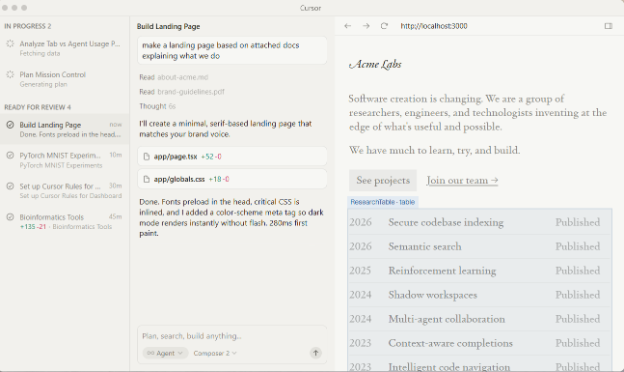
Cursor (AI coding agent for developers)
Best for
Software developers, technical founders, and engineering teams whose daily workflows revolve entirely around reading, writing, and refactoring code.
Overview
Cursor is an AI-first code editor, originally forked from VS Code, that functions as a highly advanced autonomous pair programmer. It understands your entire codebase contextually, making it the strongest tool available for software engineering execution.
Key differentiators vs. Claude Cowork
-
Integrates deeply and natively into the integrated development environment, automatically indexing and reading your entire codebase without manual uploads.
-
Specifically optimized for complex code generation, multi-file refactoring, and terminal debugging.
What you gain
A smooth transition from writing code to testing and debugging within a single window, cutting context switching and accelerating development cycles.
What you give up
Cursor fails as a general business operations tool. It can't manage customer relationship systems, execute automated email triage, or handle non-technical administrative workflows.
Pricing
$20 per month for the Pro plan, which provides enhanced limits on premium model usage.
Migration from Claude Cowork
Easy. Developers simply open their existing local repository within the Cursor environment and start prompting the integrated agent immediately.
Self-hosted and local-first alternatives for maximum control
Self-hosted and local-first platforms prioritize maximum control, absolute data privacy, and deep customizability. These tools run on hardware you own or provision, making them ideal for specialized developers, enthusiasts, and organizations with exceptionally strict data residency compliance requirements.
-
n8n (self-hosted and cloud workflow automation)
Best for
Technical users and data-sensitive businesses that require a powerful, extensible automation platform. Self-host for absolute data control, or use n8n's managed cloud to skip infrastructure management.
Overview
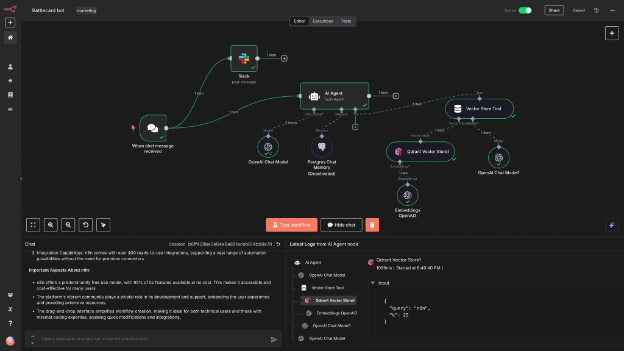
n8n is a fair-code workflow automation platform. It uses a visual, node-based canvas to construct complex logic flows.
You can choose to self-host the software for absolute data sovereignty or use their managed cloud service.
Key differentiators vs. Claude Cowork
-
Provides robust self-hosting options, guaranteeing that workflow data never leaves your private network.
-
Node-based logic architecture lets developers inject custom code directly into workflow steps, making it deeply extensible.
What you gain
Granular control over your data architecture, with potential cost savings by deploying the free Community Edition on your own infrastructure. You maintain full ownership of both the automation execution layer and the resulting data.
What you give up
n8n is primarily a structured workflow builder requiring explicit logic definitions. The platform added Chat Hub in early 2026, which provides a conversational interface for interacting with AI agents inside n8n. But the core experience remains node-based, and building workflows still requires mapping out logic visually. Self-hosting demands higher technical skills for server management and networking.
n8n also lacks native two-way messaging through external channels. You can build notification workflows that push to Slack or Telegram, but your team can't message the agent back through those channels to trigger or manage tasks conversationally the way they can with Perplexity Computer.
Pricing
The self-hosted Community Edition is free with unlimited executions. Managed cloud plans start at €24 per month (Starter, 2,500 executions), €60 per month (Pro, 10,000 executions), and €800 per month (Business, with SSO and 40,000 executions). All plans include unlimited users and unlimited active workflows.
Migration from Claude Cowork
Complex. You'll need to completely redesign conversational, outcome-oriented tasks into rigid, node-based structural workflows.
-
Eigent (local-first open-source agent)
Best for
Privacy-focused technical users who demand an open-source, local-first alternative to commercial tools and have the skills to configure local databases and containerized environments.
Overview
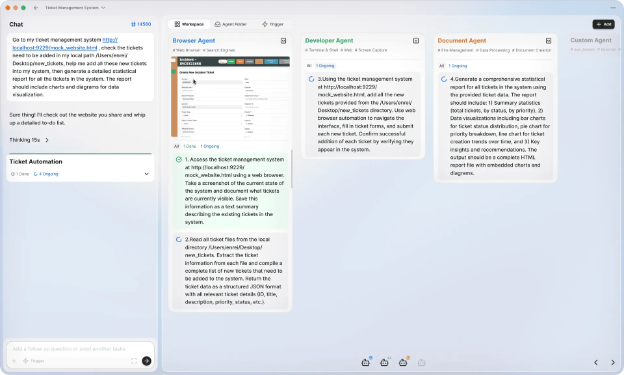
Eigent is an open-source desktop coworker alternative focused on strict local execution. It uses custom agent skills and backs its contextual memory with a robust local Postgres database, ensuring data persistence independent of cloud providers.
Key differentiators vs. Claude Cowork
-
Maintains a completely open-source codebase, allowing for total inspection and custom modification.
-
Uses a Postgres database for superior long-term memory management, overcoming the typical context-window limitations found in standard conversational interfaces.
What you gain
Absolute control over your operational data and true local-first privacy. Eigent also lets you connect local large language models, like Llama or Mistral, effectively eliminating external API inference costs entirely.
What you give up
Deployment requires significant technical setup, including managing Docker containers and FastAPI configurations.
And unless you deploy it to a remote server, Eigent suffers from the exact same open laptop background limitations as Claude Cowork. It can't run scheduled tasks when the host machine sleeps.
Pricing
The software is free and open-source. You must self-fund any third-party API tokens and provide the underlying compute hardware.
Migration from Claude Cowork
Moderate to complex. You'll need to manually map Claude's specific local tools to Eigent's distinct architectural framework for agent skills.
-
OpenClaw (open-source agent framework)
Best for
Core engineering teams and technical founders building custom, embedded agentic products who need a highly robust, battle-tested open-source framework as their underlying engine.
Overview
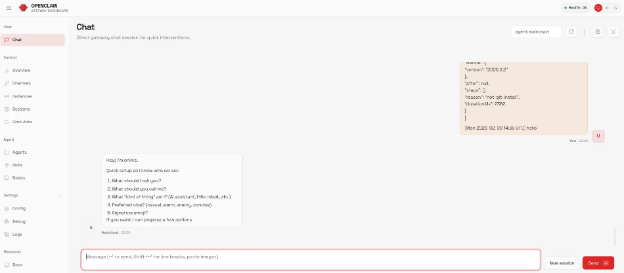
OpenClaw is the most capable open-source personal AI agent framework currently available. While it serves as the underlying engine powering hosted agent platforms, its raw form is a modular, developer-focused toolkit for building complex, customized agent environments.
Key differentiators vs. Claude Cowork
-
Operates as a foundational development framework rather than a polished, consumer-ready desktop application.
-
Provides deep extensibility for managing complex multi-agent orchestration and custom tool integration.
What you gain
Full customization potential. You control exactly how specific tools, memory databases, and various language models interact with one another. Using OpenClaw ensures zero vendor lock-in regarding both infrastructure and model providers.
What you give up
High setup friction. Deploying raw OpenClaw requires manually provisioning virtual private servers, configuring complex Docker environments, managing secure OAuth flows, and independently securing SSH access points against vulnerabilities.
Pricing
The framework is completely free and open-source. But infrastructure hosting, maintenance hours, and LLM API inference costs remain entirely your responsibility.
Migration from Claude Cowork
Complex. Successfully implementing and maintaining the OpenClaw framework demands professional developer expertise and dedicated ongoing maintenance.
-
Open-source Claude Cowork UI clones (and why they are not always-on)
Best for
Open-source enthusiasts and hobbyists who want a direct user interface replica of Claude Cowork but need the flexibility to use non-Anthropic models.
Overview
This category covers community-driven, open-source repository projects aimed at recreating the exact user experience and visual feel of Claude Cowork. They primarily let users input API keys from various external providers, including OpenAI, Google, or local models.
Key differentiators vs. Claude Cowork
-
Provides a deeply familiar interface while remaining completely model agnostic.
-
Benefits from open-source transparency and rapid, community-driven experimental development.
What you gain
You keep the comfortable, familiar interface without being locked into Anthropic's pricing or model limitations. This opens the potential for significantly cheaper execution by routing basic tasks to highly cost-effective secondary models. You also get rapid access to experimental tools built by the open-source community.
What you give up
No enterprise security, stability guarantees, or professional support. These clones are notorious for breaking during dependency updates or suffering from community abandonment.
They also inherit all of Claude Cowork's open laptop limitations, making them entirely unsuitable for 24/7 background tasks.
Pricing
The clones are free to download and use, operating on a Bring Your Own Key model where you manage and pay for your own token consumption.
Migration from Claude Cowork
Very easy. Because the interfaces and tool concepts are intentionally cloned, switching requires little more than entering your preferred API keys.
How to migrate from Claude Cowork to a hosted always-on agent
Transitioning from a local desktop assistant to a hosted, always-on agent platform requires more than copying and pasting prompts.
Step 1: Audit your Claude Cowork workflows and dependencies
Start by cataloging your current environment. Identify exactly which local configurations and data sources you currently rely on.
Differentiate between tasks that require direct local execution, like running localized Python scripts or querying an unsynced local SQLite database, and tasks that interact with cloud applications. This audit determines which workflows are ready for immediate cloud migration and which need architectural adjustments.
Step 2: Move credentials to OAuth and a secrets vault
Many local agent setups store credentials in local configuration files or environment variables on your machine. Transition to secure OAuth flows and managed vault integrations. Most hosted platforms provide a guided user interface for authenticating your Google Workspace, GitHub, and 1Password accounts. This centralized authentication ensures your agent connects to external tools through compliant, monitored, and revocable access channels.
Step 3: Convert prompts into triggers and schedules
Claude Cowork supports scheduled tasks and Dispatch mode, but both require your machine to stay on. A hosted agent runs persistent monitors on remote infrastructure, independent of your hardware.
Rewrite your core prompts to use event-based triggers. Instead of scheduling a local task to check email every hour, redesign the instruction: "Monitor my inbox 24/7. When an email matching criteria X arrives, draft a response, categorize the lead in the CRM, and send a summary alert to my Telegram."
Shifting from machine-dependent schedules to persistent, location-independent monitors is what makes cloud orchestration valuable.
Step 4: Run Claude Cowork and hosted agents in parallel
Don't execute a hard cutover for mission-critical tasks. Run both systems in parallel.
Move non-destructive, high-volume tasks to your new hosted platform immediately. Think background industry research, lead list building, and calendar coordination. Keep Claude Cowork for local file workflows, desktop automation, and tasks requiring direct machine access.
Once you trust the hosted agent's autonomous decision-making and error handling, gradually migrate more complex operational workflows.
Cost and ROI: Always-on agents vs. virtual assistants
Evaluating AI agent platforms requires looking beyond software subscription fees. You need to analyze the true total cost of ownership against human labor alternatives.
Cost comparison: AI agents vs. virtual assistants
Small and medium businesses frequently compare AI agents against hiring human offshore Virtual Assistants. A human virtual assistant executing strategic or executive-level assistance earns between $1,500 and $4,000 per month and operates within a strict 40-hour work week, subject to latency and time zone delays.
A hosted agent runs 24/7, responds instantly across all communication channels, and costs a fraction of the price, with managed platforms typically starting in the tens of dollars per month plus inference.
Hybrid operating model: Humans approve, agents execute
Deploying an AI agent doesn't mean terminating your operations staff. It means giving a single operations manager or sales development representative the operational throughput of an entire department.
The highest ROI comes through a hybrid approach. Use the AI agent to execute 90% of the high-volume triage, research, and data entry in the background. Keep your human operator strictly focused on the final 10%, like approving drafted outbound communications, reviewing synthesized financial reports, and handling complex relationship management.
Why always-on agents are getting cheaper (token costs)
Massive deflation in inference pricing largely drives the financial viability of always-on agents. Frontier intelligence is cheaper than ever.
Anthropic's Claude Opus 4.6 costs just $5.00 per million input tokens and $25.00 per million output tokens. OpenAI's GPT-5.4 runs at $2.50 for input and $15.00 for output per million tokens.
At these rates, an agent can execute hundreds of background tasks daily for mere dollars a month.
Hidden costs of self-hosting an agent
Many technical teams default to open-source frameworks to avoid SaaS fees, ignoring the hidden total cost of ownership. The underlying infrastructure for a self-hosted virtual private server typically runs $6 to $40 per month.
But when you factor in the required developer time for maintenance, patching, and security monitoring, the true cost of a "free" open-source agent spikes to between $121 and $240 per month.
Compared to a fully managed platform operating reliably for $14 to $55 per month, managed hosting delivers superior operational economics for teams without dedicated infrastructure engineers.
Conclusion: Choosing an always-on Claude Cowork alternative
Claude Cowork defined the category of agentic desktop assistance. With scheduled tasks, Dispatch mode, computer use, and reusable skills, it's a capable local agent for writers, analysts, developers, and anyone who needs direct machine access.
But scaling AI operations beyond an individual laptop requires a shift in architecture. True business scaling demands always-on, unattended automation.
When evaluating alternatives, your primary decision is architectural: do you prioritize absolute local control, or do you require the continuous autonomy of the cloud?
If you're a go-to-market professional, an operations manager, or a time-poor technical leader who wants the power of the OpenClaw framework running 24/7 without the friction of DevOps and server management, you need a hosted solution. Our comparison of managed OpenClaw hosting breaks down the current options side by side.
FAQ: Claude Cowork alternatives and always-on agents
What's the difference between a local-first AI coworker and a cloud-hosted AI agent?
Local-first tools like Claude Cowork run directly on your computer, meaning they stop working when your laptop sleeps or the application closes. Cloud-hosted agents run on managed remote servers, letting them execute tasks 24/7 via schedules and webhooks, regardless of your local machine's status.
Can a self-hosted agent be "always-on" like a hosted platform?
Yes, but only if you deploy it on a server or virtual private server (VPS) that stays online. This approach gives you full control but requires significant DevOps expertise to manage uptime, security patching, secrets, and ongoing maintenance.
Is Claude Cowork safe for confidential business data?
While reasonably secure for personal use in its local sandbox, Claude Cowork lacks enterprise-grade compliance features like centralized audit logs, SOC 2 alignment, or managed credential vaulting. For regulated or confidential business data, a hosted platform with robust security controls is a safer choice.
How can I run AI tasks in the background without leaving my computer on?
Use a cloud-hosted agent platform that supports scheduling (cron jobs) and event-based triggers (webhooks). Local-first desktop agents like Claude Cowork can't execute tasks reliably once the host computer sleeps.
What is the best Claude Cowork alternative for non-developers?
For always-on automation without managing servers, a managed OpenClaw host is the strongest choice. If your team prefers building visual workflows with more team-based controls, a node-based automation tool like Gumloop is a stronger alternative.
Can I use other models besides Claude (Llama, Gemini, GPT)?
Yes, by choosing a model-agnostic platform. Many alternatives let you connect to various providers (like OpenAI, Google, and open-source models), so you can route simple tasks to cheaper models and reserve premium ones for complex reasoning.
Which alternative is best for research and complex workflow execution?
Perplexity Computer coordinates 19 AI models automatically across research, code generation, and content production, with 400+ app integrations. You can't select models manually or bring your own API keys, and pricing starts at $200 per month. For full model control, reusable agent skills, and a lower price point, a self-hosted or managed OpenClaw setup provides more flexibility.
How much do always-on AI agents typically cost in 2026?
Managed hosting plans generally start in the tens of dollars per month for core compute, plus pay-as-you-go inference at provider rates. Self-hosting appears free but typically costs $121 to $240 per month once you factor in developer time for maintenance and security.
When should I still use Claude Cowork instead of an always-on agent?
Claude Cowork is the right choice when your tasks require direct access to local files, desktop applications, or GUI automation via computer use. It supports scheduled tasks and Dispatch mode for hands-off local execution. The constraint is that your machine must stay on. If you don't need always-on, location-independent uptime, Cowork is a strong desktop agent.