
TL;DR
- OpenClaw skills give AI agents access to real tools like Gmail, Calendar, Notion, GitHub, browsers, and search APIs to complete multi-step work for you, not just answer questions.
- This guide breaks down 11 high-impact OpenClaw skills across communication, sales, engineering, competitive intelligence, sprint management, and social monitoring, with a consistent format: what the skill does, why it matters, a founder-specific example, and what you lose without it.
- You can self-host your agent or get running in under five minutes with KiloClaw, a managed OpenClaw platform that handles secrets, security, model routing, and cost control.
- Start with four skills (GOG, Notion, Exa Search, Self-Improving Agent) and automate one painful workflow end-to-end before expanding. Most founders reclaim 5–7 hours per week.
Why startup founders struggle to improve productivity
You wear every hat. Sales calls at 9 AM, product reviews at noon, investor updates by evening.
The work that moves the needle (closing deals, shipping features, raising capital) keeps getting squeezed by admin tasks: triaging inboxes, updating CRMs, chasing meeting times, compiling research before calls.
Zapier-style automation works when the logic is simple: if form submitted, send email. But the moment your workflow requires judgment, like deciding which emails matter, personalizing outreach from recent news, or summarizing engineering progress for a board update, rigid trigger-based pipelines break down.
OpenClaw skills close that gap. They let autonomous AI agents connect to your tools, reason through ambiguity, and run multi-step workflows without you copy-pasting between tabs.
This guide covers the 11 skills that matter most for founders in 2026, how to set them up securely, and where to start.
What an OpenClaw AI agent needs to boost founder productivity
An agent that reclaims your time needs to do five things well.
Handle your messy, real-world data without breaking. Your inbox mixes meeting requests with investor updates, spam, and vendor invoices, all in different formats. Your CRM has incomplete fields. Your competitor's pricing page changes weekly. An effective agent handles messy input without needing perfect structure.
Make judgment calls, not just follow rules. When a prospect replies "let's circle back next quarter," is that a soft no or a timing issue? When your engineer merges a PR titled "fix auth flow," does that belong in the customer-facing changelog? The agent needs to reason through these ambiguities. Probabilistic reasoning outperforms traditional automation here.
Complete entire workflows, not just individual steps. Reading your Gmail helps, but has limits. The real payoff happens when your agent reads your inbox, pulls research from the web, updates your CRM, drafts a personalized email, and queues it for sending, all in one workflow.
Deliver finished work, not just summaries. Drafted emails sitting in your Gmail. Updated records in Notion. A deployed preview URL. An audio briefing ready to play on your commute. Measure your agent by what it ships, not what it says.
Be safe enough to trust with real business data. If your agent accidentally emails a client, deletes a database record, or leaks your CRM data to an unknown third party, you've got a much bigger problem than lost productivity. Security, permissions, and human-in-the-loop approvals for high-stakes actions aren't optional.
How to set up an OpenClaw agent for your startup
You can run an OpenClaw agent two ways: self-host on your own infrastructure, or use a managed platform. Both work, but the trade-offs matter.
Path A: Self-hosted OpenClaw agent setup
Self-hosting gives you full control over the runtime, the data, and the configuration.
-
Provision a runtime environment. You'll need a VPS or cloud instance running Docker with enough resources to run skills (some, like Playwright, need headless Chromium). Set up SSL certificates, configure networking, and build a deployment pipeline.
-
Install skills and manage dependencies. Install skills via
clawhub install [skill-name], but each has its own dependency chain. Version conflicts between skills, breaking upstream API changes, and security patches all fall on you. A skill that worked last month might break after a dependency update. -
Configure authentication for every tool. Each skill connects to a different service with its own auth flow. Google Workspace requires Admin consent and OAuth 2.0 with specific API scopes. GitHub needs a GitHub App installation. Notion requires an Internal Integration Token with explicit page sharing. Exa needs an API key. You configure all API keys and secrets directly in your terminal using environment variables or a
.envfile, and you're responsible for storing them securely, rotating them on schedule, and handling token refresh flows. -
Handle security, patching, and monitoring. You keep Docker images updated, rotate secrets, monitor for unauthorized network egress, and audit which skills access which data. Nobody automatically audits community-contributed skills.
-
Manage cost and model routing. Without built-in routing, your agent might burn tokens and money by using an expensive frontier model for simple tasks like formatting a CSV. You'll need to configure model routing yourself to control costs.
The honest trade-off: Self-hosting works if you have infrastructure experience and want full control. For most founders, though, it replaces one productivity drain (manual admin work) with another (weekend DevOps). You trade inbox triage for Docker debugging. If you're not strong at infrastructure, the time you invest often cancels out the productivity you gain.
Path B (recommended): Managed OpenClaw setup with KiloClaw in five mins
KiloClaw is a managed OpenClaw platform built to eliminate infrastructure work so you can focus on workflows.
-
Create your environment. Sign up and spin up a sandboxed agent runtime. KiloClaw handles provisioning, SSL, networking, and container isolation. No Docker, no VPS.
-
Install skills. You can install any OpenClaw skill using ClawHub, which comes pre-installed, or explore ClawBytes recipes provided by KiloClaw.
-
Connect your tools. KiloClaw supports native integration with Google Workspace, Linear, GitHub, Brave Search, and 1Password. For other services, you configure API keys through the KiloClaw Settings dashboard, which patches them directly to your agent's openclaw.json. All credentials are stored in an encrypted vault and decrypted only inside your isolated VM at runtime. You authenticate once and your agent handles the rest.
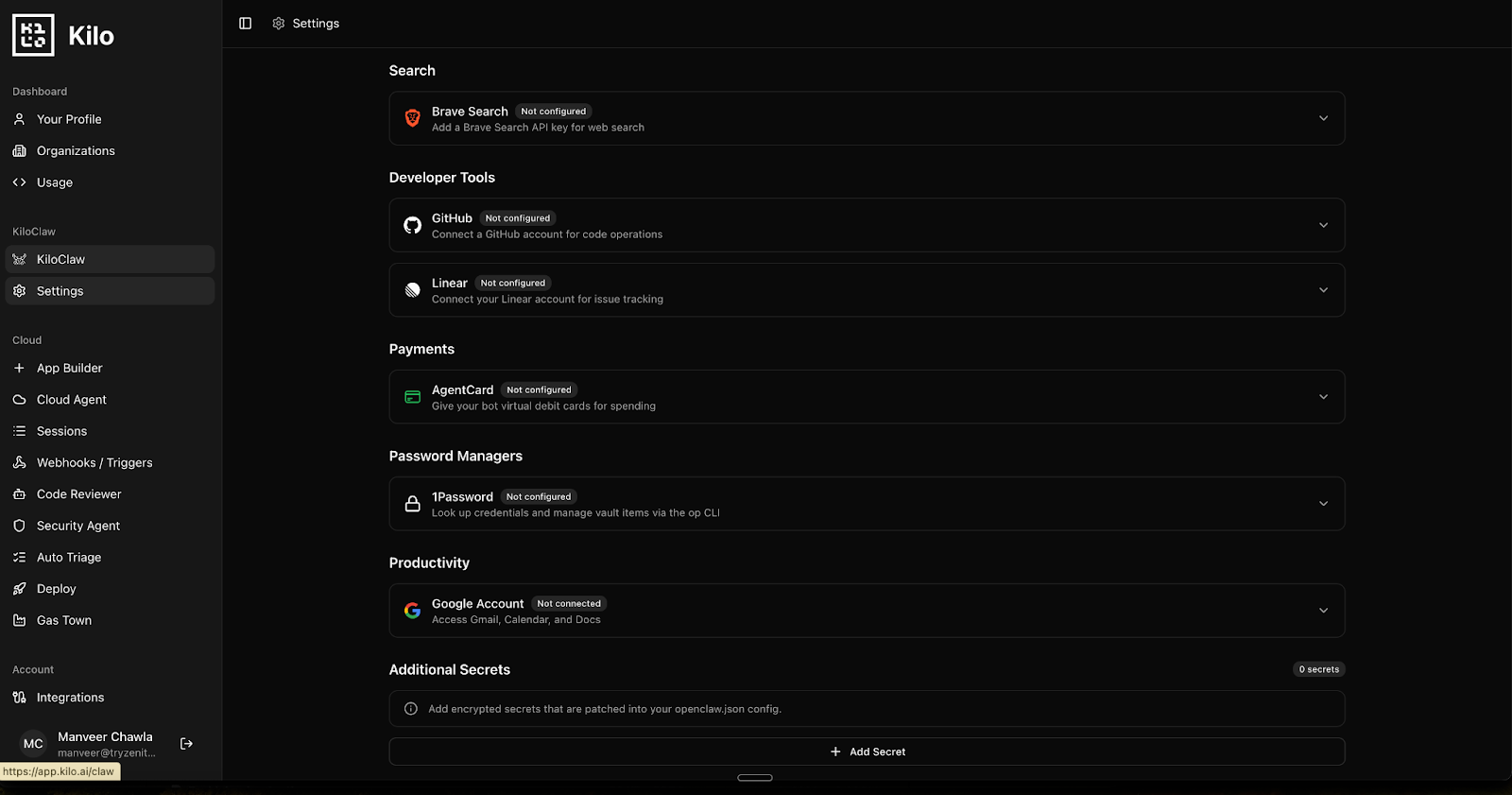
- Define your workflow and run it. Map out the process you want to automate (say, Monday morning outreach prep), assign the relevant skills, and trigger the workflow. KiloClaw handles running, logging, and recovering from errors.
What KiloClaw handles so you don't have to:
- Sandboxed runs. Each customer's agent runs inside a dedicated Firecracker micro-VM with hardware-level isolation, not containers. A compromised or buggy skill can't access other customers' data or escape your virtual machine boundary.
- Secrets management. KiloClaw encrypts API keys, OAuth tokens, and credentials at rest (RSA-OAEP with AES-256-GCM) and in transit (TLS). Secrets are decrypted only inside your isolated VM at runtime.
- Security auditing. KiloClaw's build pipeline enforces version pinning and SHA-tagged images with full traceability to source code. An independent security assessment confirmed no injection vulnerabilities across 60+ adversarial tests and no cross-tenant access paths. Egress monitoring and skill-level permission controls are on the roadmap.
- Model flexibility and cost control. KiloClaw uses Kilo Gateway by default, giving your agent access to 500+ AI models through a single integration. You can also bring your own API keys from Anthropic, OpenAI, Google, and others. Choose the right model for each task rather than paying frontier pricing for everything.
For most founders, KiloClaw is the right choice: zero to a production-ready agent in under five minutes, professional-grade security, and your time goes toward defining workflows instead of managing infrastructure.
Top 11 OpenClaw skills for startup founders to improve productivity
OpenClaw skill summary for startup founders
| OpenClaw Skill | What it solves | What it unlocks |
|---|---|---|
| GOG | Reclaiming your inbox & calendar | Autonomous inbox triage and meeting coordination |
| AgentMail | Reclaiming your inbox & calendar | Reliable, high-deliverability outbound email |
| Notion | Keeping your data current | Living CRM, auto-filed meeting notes, current SOPs |
| GitHub | Understanding what your team ships | Human-readable changelogs and shipping status for non-technical stakeholders |
| Vercel | Moving faster without your dev team | Preview deployments and landing page experiments without dev bottlenecks |
| Playwright | Tracking your competitors | Structured data from competitor and vendor sites |
| Exa Search | Automating your research | AI-native prospect research and industry intelligence briefs |
| Self-Improving Agent | Reducing costs and getting faster over time | Automatic workflow tuning, prompt optimization, and token cost reduction |
| ElevenLabs | Keeping stakeholders in the loop | Audio briefings from written reports for on-the-go listening |
| Linear | Running tighter sprints | Automated ticket triage, sprint hygiene, and cross-team status visibility |
| Search X | Catching market signals in real time | Real-time X/Twitter monitoring for brand mentions, prospect activity, and market signals |
Skill #1: GOG (Google Workspace) — AI email and calendar automation
Function: Your agent accesses Gmail, Google Calendar, and Drive to read emails, check your availability, draft replies, compose new outbound messages, and manage calendar events for you.
Why it matters: Email and calendar drain founder time faster than anything else. You spend 90 minutes a day triaging messages, proposing meeting times, and switching between threads.
GOG handles the mechanical parts: your agent reads incoming messages, identifies what each one needs, checks your calendar, and drafts contextual replies or new outbound messages, all before you open your laptop. You review and approve. The 90 minutes becomes 15.
Example use: You wake up to 30 overnight emails. Your agent has already sorted them: three meeting requests have draft replies with two available time slots each, a vendor follow-up has a "received, reviewing internally" draft, and an investor asking for a metrics update is flagged for your personal attention. You sit down with coffee and everything's waiting.
Without it: Every email requires a manual read-and-respond. Scheduling becomes a back-and-forth that stretches a 30-second task into a 10-minute thread. Your mornings start reactive instead of strategic.
Skill #2: AgentMail — High-deliverability outbound email
Function: Your agent sends outbound emails through dedicated, high-deliverability infrastructure, protecting your domain reputation so messages land in inboxes, not spam folders.
Why it matters: When you push outreach beyond a handful of emails, deliverability risks grow fast. Sending through your regular email setup gets you flagged as spam.
AgentMail routes messages through infrastructure built for high-volume sending with proper domain authentication. Your agent drafts personalized emails, you review them, and AgentMail dispatches them through a clean sending channel. Your reputation stays intact and emails get read.
Example use: After your agent finishes Monday's prospect research (via Exa) and updates your CRM (via Notion), it drafts personalized follow-ups for each lead, referencing their recent funding round, a new hire, or a product launch. You spend five minutes reviewing the batch. Once approved, AgentMail sends them and replies start landing by Tuesday afternoon.
Without it: You send outreach manually or risk deliverability problems when volume increases. Follow-ups slip through the cracks. Your outbound pipeline stalls because sending is the bottleneck, not strategy.
Skill #3: Notion — Automated CRM and knowledge management
Function: Your agent reads and writes directly to your Notion workspace, updating CRM records, appending meeting notes, modifying page properties, and keeping documentation current in real time.
Why it matters: Your CRM, meeting notes, runbooks, and product roadmap probably live in Notion. When your agent can read and write to these pages, they stop being static documents and become a live operational layer.
After every sales call, the agent files notes and action items to the right client page. When new research arrives, the agent appends it to the prospect record. SOPs stay current because the agent updates them as processes change.
Example use: Your agent processes a sales call transcript, extracts three action items and a pricing objection, appends them as a checklist to the client's Notion page, updates the deal stage to "negotiation," and tags your co-founder for review. The CRM reflects reality within minutes of the call ending.
Without it: Meeting notes scatter across email threads, Slack messages, and personal docs. CRM records go stale because nobody updates them manually. Your team makes the same decision twice because documentation lags behind.
Skill #4: GitHub — Automated changelogs and engineering visibility
Function: Your agent reviews what your engineering team shipped (pull requests, commits, issues) and translates technical updates into plain-language changelogs and status reports.
Why it matters: If you're a non-technical founder, or a technical founder too busy to review every PR, you lose visibility into what your engineering team ships.
GitHub access lets your agent translate commit messages and PR titles into plain language. The agent drafts weekly product changelogs, flags security-related merges, and tracks milestone progress. Your board and marketing team get shipping updates without interrupting engineering.
Example use: Every Friday, your agent reviews all PRs merged during the week, groups them by feature area, and drafts a customer-facing changelog and an internal engineering summary. The changelog goes to marketing for the Monday newsletter. The internal summary goes to your investor update doc in Notion.
Without it: Engineering progress stays a black box unless you ask for updates. Changelogs become a chore that delays product announcements. Status updates require interrupting developers.
Skill #5: Vercel — Deploy landing pages without engineering
Function: Your agent triggers deployments, spins up preview environments, and generates shareable URLs so you can ship landing pages and small changes without waiting on engineering.
Why it matters: Small product tweaks, landing page experiments, and copy changes shouldn't require pinging your dev team.
With Vercel access, your agent deploys approved changes, generates preview URLs for review, and pushes to production once you sign off. Growth experiments go from "waiting on engineering" to "live in an hour."
Example use: You want to test a new pricing page before your investor meeting next week. You describe the changes, your agent updates the copy, triggers a Vercel preview deployment, and sends you the preview URL. You review it on your phone between meetings, request one tweak, and approve the final version, without a single Slack message to your dev team.
Without it: Every small change requires dev team involvement. Landing page experiments sit in a queue. You miss market windows because deployment bottlenecks block you.
Skill #6: Playwright — Web scraping and competitor tracking
Function: Your agent browses any website the way a human would, navigating pages, reading content, and extracting data. It returns structured results, even from sites that offer no API access.
Why it matters: Not every source gives you a clean way to pull data. Competitor pricing pages change constantly. Legacy vendor portals require logging in and clicking through forms.
Playwright lets your agent visit these sites, extract what matters, and deliver results in a format you can act on.
Example use: Every Monday, your agent visits your top three competitors' pricing pages, extracts their enterprise tier pricing and feature lists, compares them against last week's data, and saves a competitive pricing report as a markdown file. If any competitor changed pricing, you get a Slack alert with the diff.
Without it: You manually check competitor sites (and forget half the time). Legacy system integrations stay manual. Extracting web data remains tedious and error-prone.
Skill #7: Exa Search — AI-native prospect research
Function: Your agent researches using Exa, an AI-native search engine that returns structured facts and highlights instead of a list of links, ready to use in outreach, briefs, and reports.
Why it matters: Traditional search gives you ten links and expects you to read them. AI-native search gives your agent structured facts, key highlights, and source citations, ready to use immediately.
Your agent compiles weekly intelligence briefs on industry trends, researches prospect backgrounds before sales calls, and surfaces funding announcements or leadership changes. Research that took you an hour takes your agent three minutes.
Example use: Before your Monday outreach batch, your agent queries Exa for recent news on ten target companies: funding rounds, executive hires, product launches, press mentions. The agent extracts the key facts, structures them by company, and appends the research to each prospect's Notion page. When you review the outreach drafts, every email references something specific and current.
Without it: Prospect research stays manual and inconsistent. Some calls are well-prepared, others aren't. Industry trends require daily reading you never have time for. Your outreach feels generic because it is.
Skill #8: Self-Improving Agent — Automatic workflow optimization
Function: Your agent analyzes its own past runs, identifies slow steps, redundant prompts, and expensive model calls, then rewrites its own workflows to get faster and cheaper over time without you tuning anything.
Why it matters: Every workflow starts unoptimized. Your agent might use 2,000 tokens where 600 would suffice, or call an expensive model for a task a cheaper one handles fine.
Self-Improving Agent fixes this automatically. The agent reviews its logs, identifies waste, rewrites prompts to be more concise, and reroutes simple steps to smaller models. Over weeks, your daily workflows get measurably faster and cheaper.
Example use: After two weeks of running your Monday outreach workflow, your agent reviews its logs and discovers the research summarization step uses three times more tokens than needed. The agent rewrites its own prompt, switches that step to a smaller model, and cuts the workflow's total token cost by 35%, with no change in output quality. Your monthly agent bill drops without you touching a thing.
Without it: Workflows stay as expensive and slow as day one. Optimizing costs requires you to manually review logs and tweak prompts. Your agent bill grows linearly with usage instead of improving.
Skill #9: ElevenLabs — AI audio briefings for stakeholders
Function: Your agent converts written reports and summaries into professional, natural-sounding audio briefings via ElevenLabs, ready to listen on a commute, a run, or between meetings.
Why it matters: Not every stakeholder reads written reports. Audio briefings let you, your investors, your advisors, and your team leads consume updates while commuting, exercising, or between meetings.
Your agent converts weekly progress reports, daily metric summaries, or market research into a two-minute podcast-style briefing. A five-page document becomes something you absorb during a morning walk.
Example use: Every Friday, your agent compiles the week's key metrics (revenue, churn, new signups, engineering velocity) into a concise summary, then converts it into a professional audio briefing. You listen on your Saturday morning run. Your investors get the same briefing in their inbox, ready to play.
Without it: Written reports pile up unread. Stakeholder updates require scheduling calls or writing long emails. You can only consume information at a screen.
Skill #10: Linear — Automated sprint management and ticket triage
Function: Your agent manages your Linear workspace by triaging incoming issues, flagging blocked work, assigning tickets, and compiling sprint status so your team walks into standup with full context.
Why it matters: As your team grows past three or four people, project management becomes its own job. Tickets pile up, sprint planning runs long, and nobody sees clearly what's blocked.
Linear access lets your agent handle the project hygiene nobody wants to do: triaging bug reports, flagging stale tickets, auto-assigning based on capacity, and compiling sprint summaries for your leadership sync.
Example use: Every morning before standup, your agent scans your Linear workspace. It flags three tickets stuck "in progress" for over a week, triages two overnight bug reports as P1 and P3, and posts a standup summary to Slack with blocked items highlighted. It assigns the P1 to the on-call engineer and updates the sprint board. Your 15-minute standup stays at 15 minutes because everyone walks in with context.
Without it: Sprint boards go stale. Bug reports sit unassigned. Status meetings turn into status-gathering sessions. You spend your evenings triaging tickets instead of thinking about product direction.
Skill #11: Search X — Real-time X/Twitter monitoring for sales signals
Function: Your agent monitors X/Twitter in real time, tracking brand mentions, prospect activity, competitor moves, and industry conversations, then delivers a filtered digest of what matters.
Why it matters: X is where your market talks in real time. Product complaints, competitor announcements, funding news, and industry takes all surface there before traditional news covers them. But manually scrolling X is a productivity black hole.
Search X gives your agent structured access to this firehose, tracking brand mentions, prospect and competitor activity, and flagging the signals worth acting on.
Example use: Every morning, your agent queries Search X for mentions of your product, posts from your top prospect accounts, and trending conversations around your keywords. Today's digest: a VP of Engineering at a target account tweeted frustration with their current vendor, and a competitor announced a price increase. Your agent appends the VP's tweet to their Notion prospect page and flags them for outreach.
Without it: You miss real-time buying signals because you can't monitor X consistently. Competitor announcements catch you off guard. Brand mentions go unnoticed for days.
Recommended OpenClaw skill stack for startup founders
Don't deploy all 11 skills at once. Build incrementally, starting with the workflows that cost you the most time.
Minimum viable OpenClaw skill stack
Start here. These four cover your highest-frequency pain points:
- GOG (Google Workspace) — Inbox triage and calendar scheduling drain time daily. Automating them is the fastest win.
- Notion — Your knowledge base connects to everything. Once your agent can read and write to Notion, you have a central data hub for all other workflows.
- Exa Search — Research compounds over time. Weekly intelligence briefs, prospect research, and trend monitoring deliver value from day one.
- Self-Improving Agent — Your agent optimizes its own workflows from day one, cutting token costs and speeding up runs without manual tuning.
This stack handles communication, knowledge, research, and continuous optimization. Most founders reclaim 5–7 hours per week immediately.
OpenClaw skills for higher reliability
Once your core four run smoothly, add these to close the loop on sales and engineering:
- AgentMail — Pair with GOG and Notion. Your agent now researches, drafts, and sends outbound emails with proper deliverability.
- GitHub — If you ship software, automated changelogs and engineering visibility save your non-technical stakeholders from chasing status updates.
OpenClaw skills for scale and autonomy
Once you've proven your workflows, layer in the remaining skills based on your needs:
- Vercel — Deploy and preview without dev bottlenecks.
- Playwright — Extract intelligence from sites without APIs.
- ElevenLabs — Convert reports into audio for busy stakeholders.
- Linear — Automate ticket triage, sprint hygiene, and cross-team status visibility.
- Search X — Monitor X/Twitter for brand mentions, prospect signals, and competitor moves in real time.
Each skill you add should solve a workflow you've already identified, not a capability you might need someday.
Example workflow: How OpenClaw skills automate startup outreach
OpenClaw agent workflow: Monday morning outreach prep
This process drains founder time every week. The goal: prepare personalized outreach to 10 target companies with fresh research and relevant context.
Without an agent: You spend Monday morning manually researching each company on Google, updating prospect records in Notion, drafting individual emails in Gmail, and scheduling follow-ups. Three hours later, your morning is gone and your day is fragmented.
With this skill stack:
-
Research (Exa Search): Your agent queries Exa for recent news, funding announcements, and leadership changes at ten target companies. It extracts highlights and key facts, structured, sourced, and ready to reference.
-
CRM Update (Notion): The agent deduplicates contacts against your Notion CRM, appends fresh research to each prospect's page, and updates their status. No duplicates, no stale data.
-
Email Drafting (GOG): Using the Exa research and Notion context, your agent drafts personalized outreach emails in Gmail, each one referencing something specific ("Congrats on the Series B close last month" or "Saw your new VP of Engineering hire"). Drafts save for your review.
-
Your Review (30 minutes): You scan the drafts, adjust tone on two of them, and approve the batch.
-
Delivery (AgentMail): The agent sends approved emails via your dedicated infrastructure. Messages land in inboxes, not spam. Replies start arriving by Tuesday.
Result: Three hours of fragmented manual work becomes 30 minutes of focused review. The agent handles research, deduplication, personalization, and delivery. You handle the judgment calls.
An autonomous agent differs from a basic automation script in one critical way: the agent adapts to unstructured research, personalizes based on context, and chains five skills into a single workflow.
On KiloClaw, you configure the entire workflow in under 30 minutes. The platform handles running, security, and skill orchestration. Self-hosting the same workflow means writing your own orchestration logic and managing the infrastructure underneath.
OpenClaw skills vs Zapier, ChatGPT, and manual workflows
| Approach | What it does well | Where it falls short |
|---|---|---|
| Manual workflows | Full human judgment and control, zero automation risk | Hours per week on repetitive tasks, doesn't scale, context lives in your head |
| Basic LLM usage (ChatGPT, Claude chat) | Strong for brainstorming, analysis, and one-off questions | No tool access. Can't send emails, update your CRM, or deploy code. Everything requires copy-paste |
| Traditional automation (Zapier, Make) | Reliable trigger-based workflows, low-code setup | Breaks with ambiguity, can't reason about context, rigid pipelines, one action per trigger |
| OpenClaw agents | Contextual reasoning + multi-tool orchestration, end-to-end workflows, human approval for high-stakes actions | Requires thoughtful setup, security discipline, and skill selection. More powerful but not plug-and-play |
Traditional automation handles predictable, structured tasks well. OpenClaw agents handle the messy, multi-step, judgment-heavy work that founders actually spend their time on. You invest more in setup and security upfront, but you gain the ability to automate workflows that were previously impossible to delegate.
Start automating your startup with OpenClaw skills
The 11 OpenClaw skills in this guide cover the work that quietly eats founder time: inbox management, prospect research, CRM updates, engineering visibility, outreach, deal preparation, sprint hygiene, and social monitoring.
Individually, each skill solves a narrow problem. Stacked with purpose, they form an autonomous operations layer that runs 24/7.
Start with your three highest-friction tasks. Deploy the minimum viable stack. Measure the hours you reclaim. Then expand. The founders who get the most from these tools aren't the ones who install everything. They're the ones who automate one broken workflow end-to-end and build from there.
To improve productivity, startup founders need an OpenClaw agent equipped with communication, research, knowledge management, and operational skills, deployed in a secure, reliable environment.
How to get started with OpenClaw and KiloClaw
Pick one workflow that costs you the most time, whether that's inbox triage, prospect research, or weekly reporting, and automate it end-to-end. Measure what improves before adding more skills.
If you want to skip the infrastructure work and get a production-ready agent running in minutes, KiloClaw provides a managed, secure environment with verified skills and built-in security. If you prefer full control, the OpenClaw documentation covers self-hosted setup.
Either way, start small. The goal is reclaiming your time, not building another system to maintain.
Frequently asked questions about OpenClaw skills for startups
What skills does an OpenClaw agent need to improve founder productivity?
At minimum: Google Workspace for email/calendar, Notion for knowledge management, Exa Search for research, and Self-Improving Agent for automatic cost and speed optimization. These four cover the highest-frequency time drains.
What is the minimum skill stack to get started?
Four skills: GOG (communication), Notion (knowledge), Exa Search (research), and Self-Improving Agent (optimization). These handle your inbox, keep your CRM current, automate prospect research, and ensure your workflows get cheaper and faster over time. Add AgentMail and GitHub when you're ready to grow.
How do you set up an OpenClaw agent?
Two options. Self-host with Docker and manage your own infrastructure (VPS, secrets, security patches), or use a managed platform like KiloClaw that handles the runtime, security, and skill management. Most founders find the managed path faster.
Do you need all 11 skills to get started?
No. Start with four. Each additional skill should solve a specific workflow problem you've already identified. Adding skills without a use case just adds complexity.
Are OpenClaw skills safe to use in production?
Not automatically. Skills run with the permissions you grant them. Apply least-privilege access, require human approval for high-impact actions, and prefer sandboxed runs. Skills run inside the agent process, while MCP tools run outside in isolated processes. MCP is generally safer for production deployments.
Can these agents run fully autonomously without human review?
For low-risk work like research, drafting, and data syncing, yes. For anything external (sending emails, deploying to production, deleting records), keep a human in the loop. That's operational discipline, not a limitation.