
If you are looking to switch from Windsurf because you need portability, model control, and pricing transparency, Kilo Code is the right place.
Kilo Code runs in VS Code, JetBrains IDEs, the CLI, and cloud workflows. It keeps project instructions in plain-text files like AGENTS.md, supports MCP, gives you access to 500+ models through Kilo Gateway, supports BYOK, and works with local models through Ollama or LM Studio.
This guide shows how to move your Windsurf workflow into Kilo Code: install Kilo, set up auth, move project instructions, recreate MCP, map Cascade-style workflows to Kilo agents, validate autocomplete, and cut over safely.
The short version
# 1. Install Kilo in your target editor
code --install-extension kilocode.Kilo-Code
npm install -g @kilocode/cli

# 2. Authenticate and validate config
kilo auth login
kilo config check

# 3. Create portable project config
touch AGENTS.md
mkdir -p .kilo/agents .kilo/rules .kilo/command

# 4. Move reusable Windsurf rules, prompts, and MCP config into Kilo files

# 5. Smoke-test chat, edits, autocomplete, MCP, CLI, and one review workflow
What maps cleanly: chat, agentic editing, MCP, project instructions, custom agent behaviour, CLI workflows, model selection, code review, and cloud-agent style work.
What does not map one-to-one: Windsurf's Supercomplete, Tab-to-jump, Tab-to-import, editor memories, team rules in the Windsurf dashboard, and any automation or workflows that depend on Windsurf-specific UI state.
Why Kilo works for this migration
Kilo gives you a portable AI coding setup across editor, CLI, model provider, and automation workflows.
Model choice and BYOK. Kilo gives you access to 500+ models through Kilo Gateway, plus BYOK across all features and local models when you want them.
Transparent pricing. Kilo shows token usage and provider pricing directly, so usage maps to model/provider cost instead of a credit abstraction.
Open source and inspectability. Kilo is open source under the MIT license. You can inspect how prompts, context, tools, permissions, and model calls are wired. That matters when AI coding becomes part of your engineering process rather than a side tool.
Host flexibility. Kilo runs in standard VS Code, JetBrains IDEs, CLI sessions, Cloud Agents, and code review workflows.
Windsurf to Kilo feature mapping
| Windsurf | Kilo Code | Migration note |
|---|---|---|
| Windsurf Editor | Kilo Code for VS Code, JetBrains, and CLI | Install Kilo in VS Code or JetBrains, then install the CLI for terminal workflows. |
| Cascade | Kilo agents and subagents | Map general coding work to code, architecture to plan, debugging to debug, and specialized behaviour to custom agents. |
| Supercomplete | Kilo autocomplete and Next-Edit | Not a perfect replacement. Kilo Next-Edit predicts likely next code modifications with Mercury Edit 2; Devin Desktop Supercomplete is a broader editor-native Tab mode for additions and deletions around the cursor. |
| Tab-to-jump / Tab-to-import | Next-Edit for jump-to-edit-style suggestions; no direct Tab-to-import equivalent | Use Kilo Next-Edit for predicted next modifications, and rebuild import-specific workflows around autocomplete, agentic edits, and explicit file context. |
| Memories | AGENTS.md, .kilo/rules, and custom agents | Move durable team/project knowledge into repo-owned text files. Keep personal preferences in global Kilo config. |
| Rules and prompts | AGENTS.md, custom agents, and workflows | Stable project policy goes in AGENTS.md; specialized personas go in .kilo/agents; reusable commands go in .kilo/command. |
| MCP | Kilo MCP | Recreate MCP servers in kilo.jsonc and validate permissions. |
| Built-in model routing | Kilo Gateway, BYOK, and local models | Choose managed gateway, direct provider keys, or local providers per workflow. |
| Credit usage model | Token-level provider pricing | Rebuild budget reporting around token usage rather than Windsurf credits. |
| Team plan | Kilo teams and billing | Recreate seats, org settings, model access, and repo integrations in Kilo. |
| Code review workflows | Kilo Code Reviews and /local-review | Use hosted PR reviews for GitHub/GitLab and local review before pushing. |
| Cloud-style delegated work | Kilo Cloud Agent | Configure repo integrations and secrets separately from local IDE auth. |
File and config mapping
Windsurf configuration is less standardized as portable repo files than Kilo's target model. Treat this as a configuration redesign, not a bulk copy.
| Windsurf concept | Kilo equivalent | What to do |
|---|---|---|
| Project-wide coding instructions | AGENTS.md | Move durable repo policy here: coding standards, testing rules, review expectations, architecture caveats. |
| Reusable prompts | .kilo/command/*.md | Turn common prompt flows into Kilo workflows. |
| Specialized Cascade usage patterns | .kilo/agents/*.md | Create custom agents with prompts, model defaults, and permissions. |
| Memories or persistent project notes | AGENTS.md or .kilo/rules/*.md | Keep stable team knowledge in version-controlled text. Avoid dumping noisy personal history into repo instructions. |
| MCP servers | mcp in kilo.jsonc | Recreate server definitions and re-authenticate. |
| Provider credentials | kilo auth login, /connect, environment variables, or BYOK setup | Do not transplant Windsurf credentials. Re-authenticate explicitly. |
| Team policies | Kilo organization settings plus repo config | Recreate seat, provider, model, review, and permission policy in Kilo. |
| Ignore/exclusion behaviour | .kilocodeignore, permissions, and repo config | Review what should be hidden from AI context and what should be blocked from edits. |
Migration, step by step
Budget 30 to 90 minutes for an individual developer. Budget longer for teams with shared rules, MCP, code review automation, budget controls, or security review requirements.
1. Install Kilo in the target environment
For VS Code:
code --install-extension kilocode.Kilo-Code
For CLI:
npm install -g @kilocode/cli
kilo --version
Then authenticate and validate:
kilo auth login
kilo config check
Kilo supports VS Code, JetBrains IDEs, and CLI workflows. Install the surfaces you use, then validate them with the same repository and model provider setup.
2. Choose your model provider path
Pick this early, because it affects cost, governance, and rollout.
Managed path: use Kilo Gateway for access to 500+ models with no provider-by-provider setup.
BYOK path: connect your own provider keys and bill directly through the provider where supported.
Local path: use Ollama, LM Studio, or another local provider for workflows that need local inference.
Hybrid path: use Gateway for most users, BYOK for specific teams, and local models for sensitive or offline tasks.
Do not copy Windsurf credentials into repo files. Re-authenticate in Kilo and keep secrets out of version control.
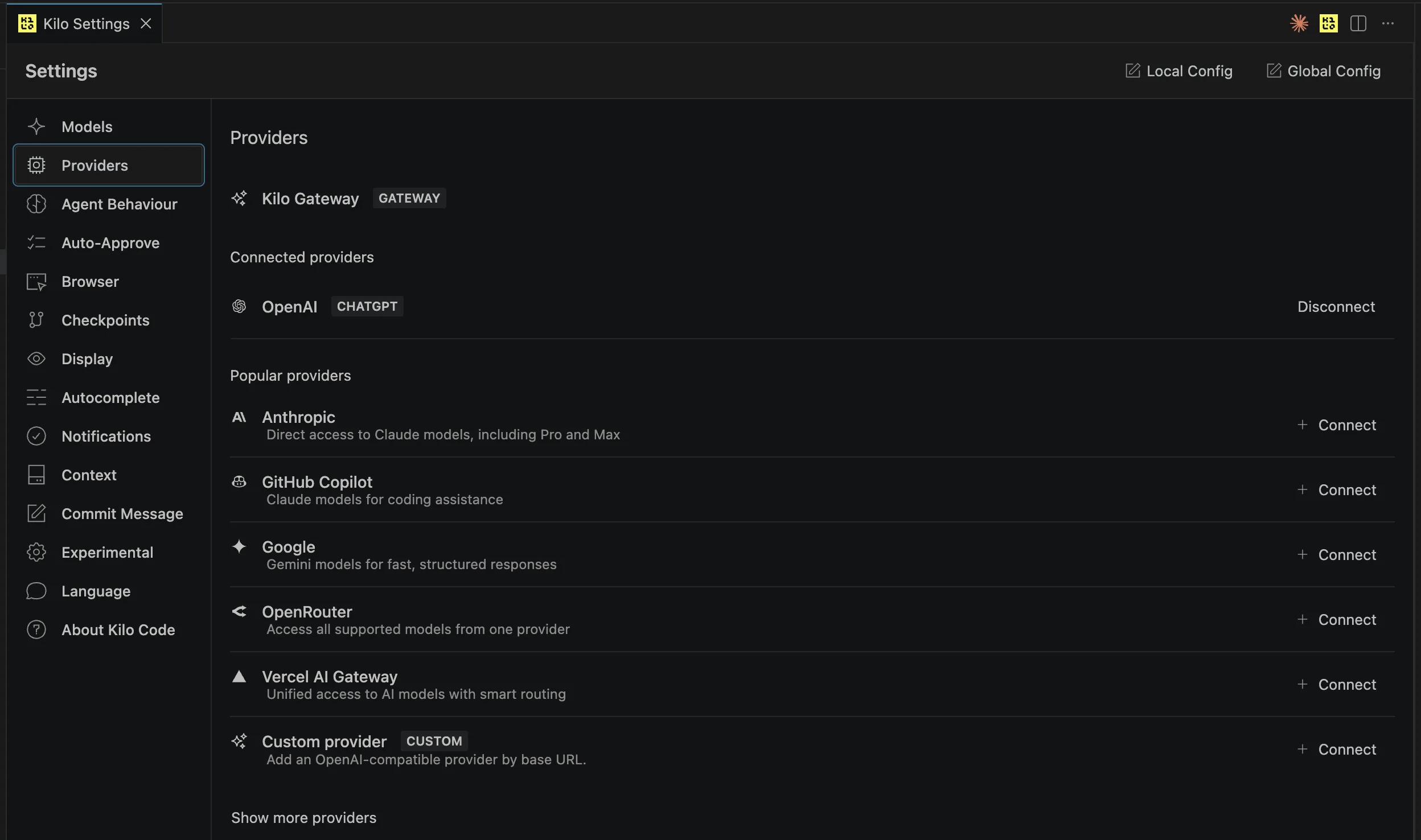
Example of setting up model providers in the Kilo Code VS Code extension.
3. Move project instructions into AGENTS.md
Start with the portable layer.
touch AGENTS.md
mkdir -p .kilo/rules .kilo/agents .kilo/command
Put stable project guidance in AGENTS.md:
- architecture constraints;
- coding style;
- test commands;
- review expectations;
- security rules;
- repo-specific gotchas;
- definitions of done.
Use .kilo/rules/*.md for additional instruction files when you want to split policy by topic. Use .kilo/command/*.md for repeatable workflows. Use .kilo/agents/*.md for specialized agent behaviour.
4. Write a starter kilo.jsonc
Start conservative. You can loosen permissions after validation.
{
  "$schema": "https://app.kilo.ai/config.json",
  "model": "kilo-auto/efficient",
  "permission": {
    "*": "ask",
    "bash": {
      "*": "ask",
      "git status*": "allow",
      "git diff*": "allow",
      "npm test*": "allow",
      "pnpm test*": "allow",
      "git push*": "deny",
      "rm *": "deny"
    },
    "edit": {
      "*": "ask",
      ".env*": "deny"
    }
  },
  "instructions": ["AGENTS.md", ".kilo/rules/*.md"]
}
Validate it:
kilo config check
Broad auto-approval is a governance decision, not a convenience setting. Keep the first pass explicit.
5. Recreate Cascade workflows as Kilo agents
Encode distinct Cascade usage patterns as custom agents rather than one giant instruction file.
Example review agent:
---
description: Read-only code reviewer
mode: primary
permission:
  edit: deny
  bash:
    "git diff*": "allow"
    "git log*": "allow"
    "*": "deny"
---

You are a code reviewer. Review diffs for correctness, maintainability,
security, and test coverage. Do not edit source files directly.
Example migration agent:
---
description: Framework migration specialist
mode: primary
permission:
  read: allow
  edit: ask
  bash: ask
---

You migrate code incrementally. Prefer small, verifiable changes.
After each change, identify the smallest useful validation command.
Keep agents narrow. Putting every rule in every custom agent recreates a large global prompt with extra files.
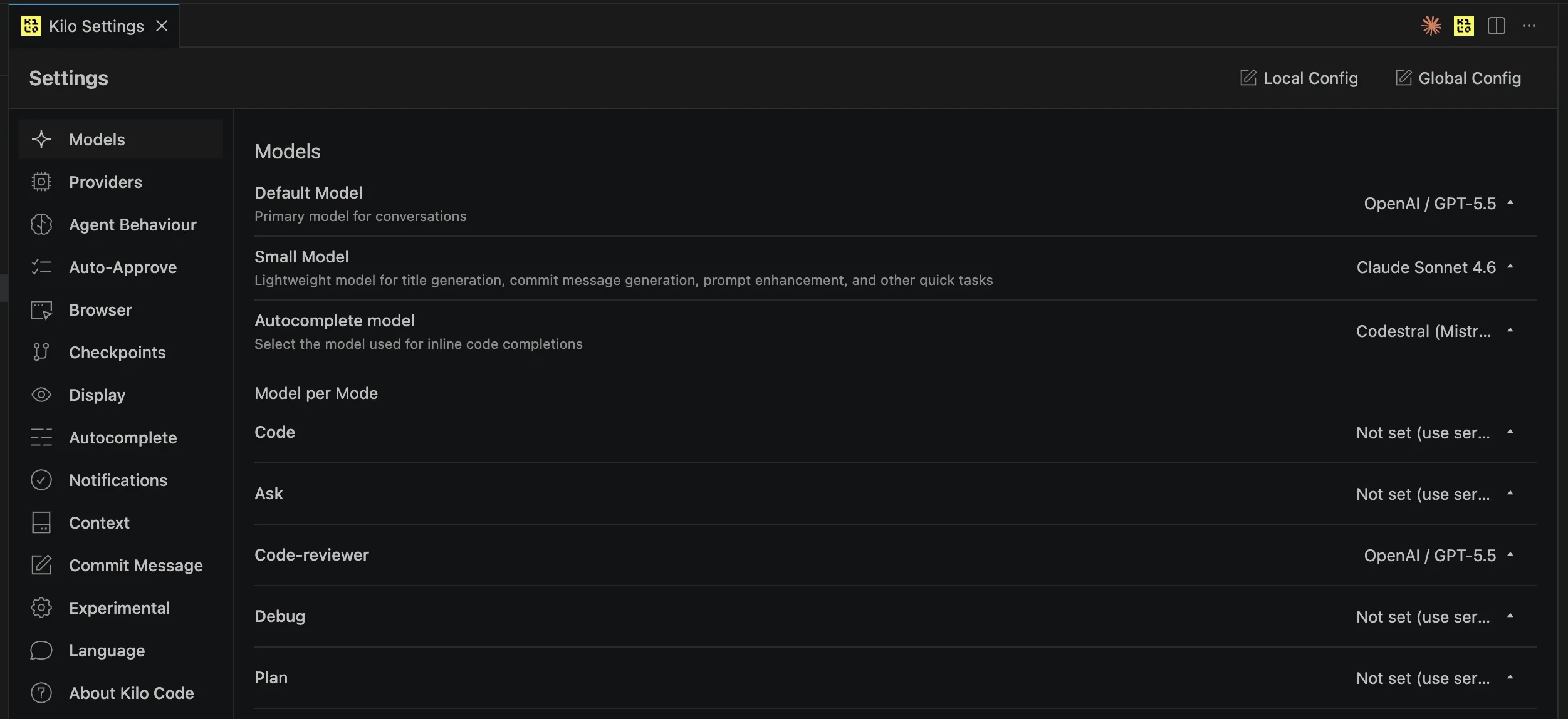
Example of setting up models per agent in the Kilo Code VS Code extension.
6. Recreate MCP servers
Kilo supports MCP in the extension and CLI. Recreate servers in kilo.jsonc, re-authenticate them, then validate one real tool call.
Example remote MCP server:
{
  "mcp": {
    "context7": {
      "type": "remote",
      "url": "https://mcp.context7.com/mcp",
      "enabled": true
    }
  }
}
Validation checklist:
- one local or remote MCP server connects;
- expected tools are visible;
- tool permissions behave as expected;
- one real task succeeds using the server.
7. Set autocomplete expectations
This is the place to be blunt: Windsurf's Supercomplete, Tab-to-jump, and Tab-to-import are not the same thing as Kilo autocomplete or Next-Edit.
Kilo autocomplete gives inline ghost-text suggestions, while Kilo Next-Edit uses Mercury Edit 2 to anticipate the next logical code modification and support jump-to-edit-style flow. Windsurf's editor-native Tab stack also predicts larger edits, imports, and next locations inside Devin Desktop. Compare those workflows directly before uninstalling Windsurf.
The tradeoff is that Kilo's workflow is portable across editor, CLI, agents, model providers, and review automation. Windsurf's strongest Tab features are tied to the Windsurf Editor.
8. Set up code reviews and cloud workflows
For local review, use /local-review inside Kilo before pushing.
For hosted PR review, configure Kilo Code Reviews for GitHub or GitLab. Validate it on a non-critical repository first.
For delegated cloud work, configure Kilo Cloud Agent with repository access, startup commands, and secrets. Treat cloud execution as a separate trust boundary from local IDE usage.
9. Cut over gradually
Do not make the first day a hard stop. Run a controlled cutover:
Day 0: Install Kilo and authenticate
  |
  v
Day 1: Move instructions into AGENTS.md and kilo.jsonc
  |
  v
Day 1: Recreate MCP and custom agents
  |
  v
Day 2: Use Kilo for normal work
  |
  v
Day 3-5: Validate review, CLI, autocomplete, and cloud workflows
  |
  v
Passes key workflows?
  Yes -> Make Kilo the default
  No  -> Keep Windsurf active while fixing Kilo config
Validation checklist
Run these before removing Windsurf from the daily workflow:
- one autocomplete task in a common file;
- one chat task that depends on repo instructions;
- one agentic multi-file edit;
- one debugging task;
- one custom-agent invocation;
- one MCP-assisted task;
- one CLI session;
- one
kilo runtask; - one
/local-reviewbefore push; - one hosted PR review for teams using review automation;
- one Cloud Agent task in a non-critical repo;
- one permission-denied test for a blocked action;
- one budget/cost check against your chosen model provider path.
Team rollout plan
| Step | Typical effort | What done looks like |
|---|---|---|
| Audit Windsurf usage | 30-60 min | You know who uses Cascade, Supercomplete, MCP, memories, team settings, and review workflows |
| Install Kilo pilot | 15-30 min | Extension and CLI installed for pilot users |
| Provider setup | 15-45 min | Gateway, BYOK, or local model path selected and validated |
| Migrate instructions | 30-90 min | AGENTS.md, kilo.jsonc, .kilo/rules, and .kilo/agents committed |
| Recreate MCP | 15-45 min | Critical MCP servers connect and pass one real task |
| Review and cloud setup | 30-90 min | Local review, hosted review, or Cloud Agent workflows validated |
| Burn-in | 2-5 days | Pilot users complete normal work without falling back to Windsurf |
Rollback
Keep rollback boring:
- keep Windsurf installed through the pilot;
- do not cancel seats or revoke access until validation passes;
- keep Kilo config changes in git so they can be reviewed and reverted;
- keep using Windsurf for any workflow that has not passed validation yet, then fix the Kilo config and retest.
What this guide does not cover
Native history migration. Treat Windsurf chat history and memories as source material. Distill durable knowledge into AGENTS.md, .kilo/rules, workflows, or custom agents. Do not assume history can be imported directly into Kilo sessions.
Exact Supercomplete parity. Kilo autocomplete and Next-Edit are useful, but they are not a clone of Windsurf's Tab experience. Compare the workflows directly before cutting over.
A one-click team migration. Team settings, budgets, model policy, review automation, and cloud workflows should be recreated deliberately. That is slower than importing a settings file, but it leaves you with a more explicit operating model.
Final note
Windsurf is good software. This migration is not about pretending otherwise.
The case for Kilo is that AI coding should be portable: repo-owned instructions, open-source tooling, explicit permissions, CLI and IDE parity, 500+ models, BYOK, local models, code reviews, and cloud agents under one workflow. You trade some Windsurf-specific editor magic for a system your team can inspect, configure, and move across tools.
The migration takes an afternoon. The portability pays back every time your model, editor, pricing, or governance needs change.
Next steps: Install Kilo Code, read the Kilo docs, or review pricing plans for your team.