
TL;DR
- Most AI coding subscriptions lock you into one vendor's models and give you vague, shifting rate limits you don't control.
- Kilo flips that: one transparent balance, 500+ models, free hosted coding models, and optional Auto Model routing that picks the right model for each task so you don't have to.
- Kilo is open source, so you can always see exactly which models ran, get granular per-model cost insight, and self-host if you need to.
- You can bring most subscriptions and coding plans you already pay for directly into Kilo via BYOK — including your ChatGPT/OpenAI subscription and your Grok subscription.
- Some plans you can buy directly in Kilo with your existing balance. The first is the MiniMax Token Plan Plus, with more on the way.
- Add Kilo Pass and you get bonus credits on top of every top-up — up to 40% extra monthly and 50% annually — that aren't locked to any single model or plan.
The real question isn't "which subscription," it's "who controls the bill"
If you search for the best AI subscription for coding, you'll find a list of monthly plans: ChatGPT Plus/Pro, Claude Pro/Max, GitHub Copilot, Cursor, a handful of others. Each promises the best model and a flat price. The problem isn't any single plan — it's that every one of them ties your workflow to decisions you never get a vote in.
Nobody runs one tool anymore. Most engineers run two to four at once, and a sizable chunk run five or more. Every one of those tools is a moving target — constant shifts in pricing, limits, and product features that you don't control. Just in the last stretch: Copilot moved every plan to usage-based token billing (the flat fee stayed, the unlimited ceiling didn't), and tools have shut down entirely, taking their workflows with them.
The lesson from your seat is always the same: build around a single vendor and their next change is your problem. The subscription that survives the next pricing shift is the one that doesn't lean on any single vendor.
What a coding subscription should actually give you
When you evaluate an AI coding subscription in 2026, the model name matters less than five structural questions:
- Model choice: Can you switch between frontier and budget models per task, or are you stuck with one lab's output?
- Cost transparency: Can you see exactly what each model cost you, or do you get a vague "credits" meter?
- Lock-in: If pricing changes tomorrow, can you move without rebuilding your stack?
- Reusability: Can you bring the subscriptions and coding plans you already pay for, instead of stacking yet another bill?
- Open source: Can you audit what's actually running, and self-host if compliance requires it?
Single-vendor subscriptions answer "no" to most of these by design. That's the gap Kilo is built to close.
How Kilo approaches the coding subscription
Instead of one subscription tied to one lab, Kilo runs on a balance and the Kilo Gateway. It's about flexibility without sacrificing performance.
Your Kilo balance is transparent and yours to spend. It gives you access to 500+ models — combine frontier models with cheaper ones, route the boring middle of the work to budget options, and run local coding models when you need to for compliance or anything else. The vision is simple: centralize your inference in the Kilo Gateway, and let one balance power all of it.
Let Auto Model do the routing
You don't have to pick a model for every task. Auto Model routes each request to a strong model for the job — frontier reasoning where it matters, cheaper models for the routine middle — so you get good results without babysitting the model picker. Choose between 500 models when you want control, or let Kilo route for you when you don't.
Open source means you can see everything
Kilo is open source. That isn't just a licensing footnote — it's what makes the cost story trustworthy. You can always see which models are being used, get granular insight into what each one costs, and use any model you want without a black-box "credits" abstraction in the way. For regulated teams, the same openness means self-hosting and local models are on the table.
Bring the subscriptions you already pay for
Here's the part single-vendor plans can't match: most of the subscriptions and coding plans you already have can come with you into Kilo via BYOK. You're not stacking another bill — you're making the ones you already pay for work harder, inside one agentic workflow.
A few worth highlighting:
Use your ChatGPT / OpenAI subscription
Your existing ChatGPT subscription gives you flat-rate access to OpenAI's strongest coding models. Connect it to Kilo with a one-click OAuth flow — no API keys to manage — and run GPT-5.5, GPT-5.3-Codex, and the rest of the Codex catalog inside VS Code or JetBrains with no extra charges beyond your subscription. When you need a model OpenAI doesn't cover, switch to Claude, Gemini, Grok, or a local model from the same picker.
See the full setup: use your ChatGPT subscription in Kilo.
Use your Grok subscription
Already paying xAI for Grok? Bring that subscription into Kilo too and use Grok's coding models in your agentic workflow alongside everything else in the gateway. Details: Grok in Kilo Code.
Buy a MiniMax coding plan directly in Kilo
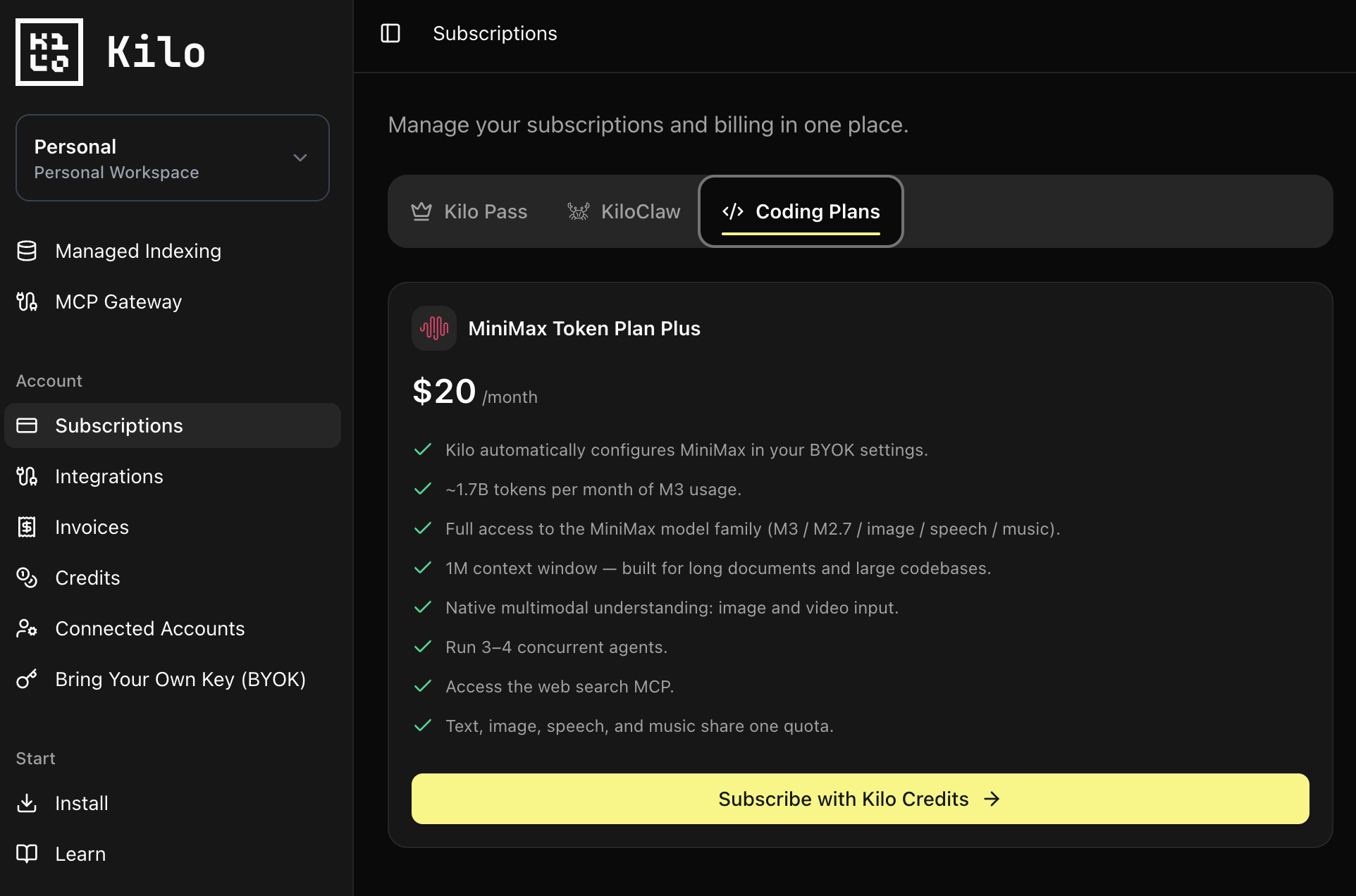
Coding plans give you more bang for the buck — more tokens and requests at a fraction of the cost. The catch with going direct to a lab is that BYOK setups can be time-consuming and confusing. So Kilo makes external coding plans available directly in your dashboard. You buy them with the credits already sitting on your Kilo balance.
The launch plan is the MiniMax Token Plan Plus at $20/month, picked on merit — MiniMax M3 sits among the most capable models on our leaderboard, at roughly a 10x discount to frontier models. With the plan you get:
- Kilo automatically configures MiniMax in your BYOK settings — no manual key wrangling.
- ~1.7B tokens per month of M3 usage.
- Full access to the MiniMax model family (M3 / M2.7 / image / speech / music).
- 1M context window, built for long documents and large codebases.
- Native multimodal understanding, 3–4 concurrent agents, and the web search MCP.
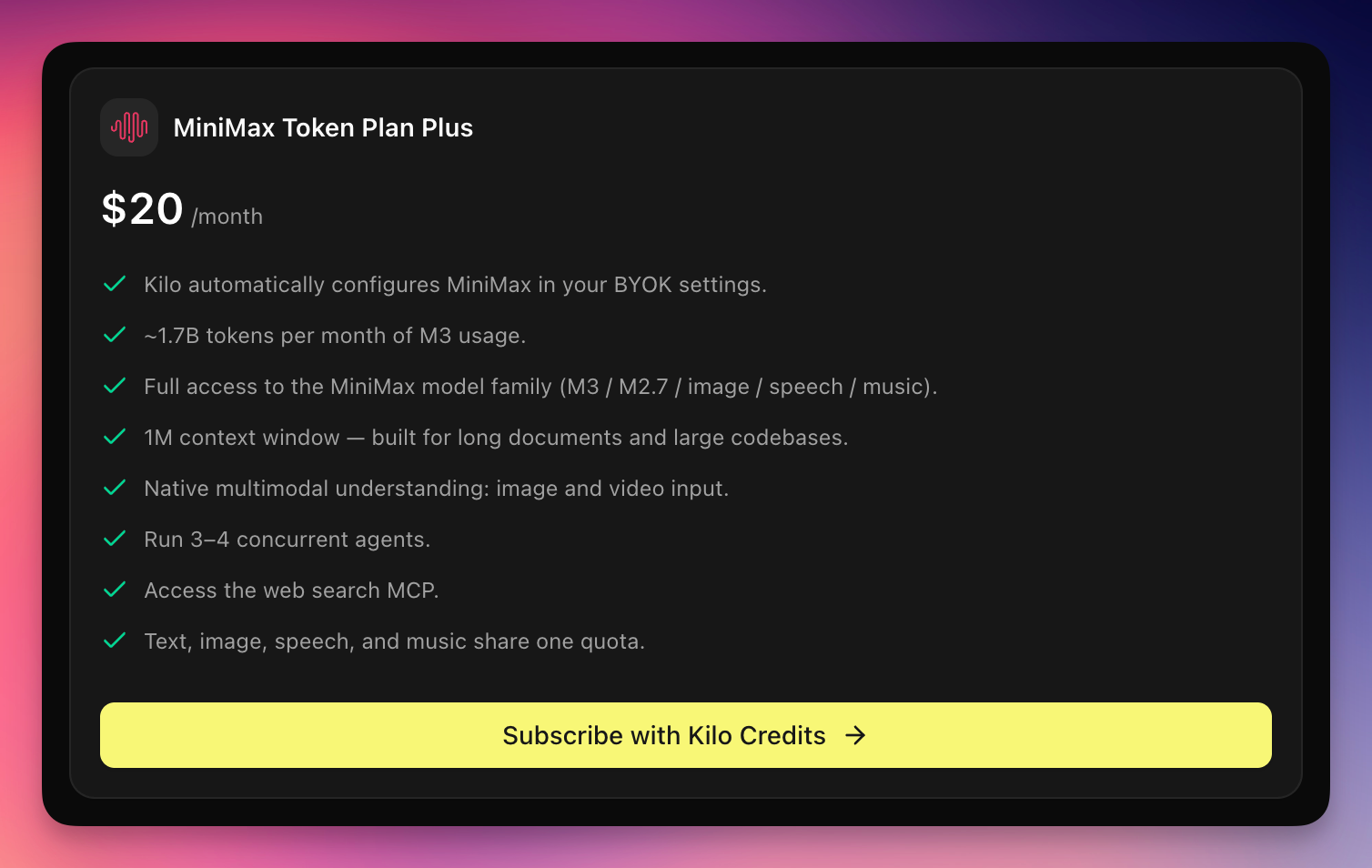
Browse what's available now and what's coming at the Kilo Marketplace — and read the launch details in Coding Plans are live in Kilo.
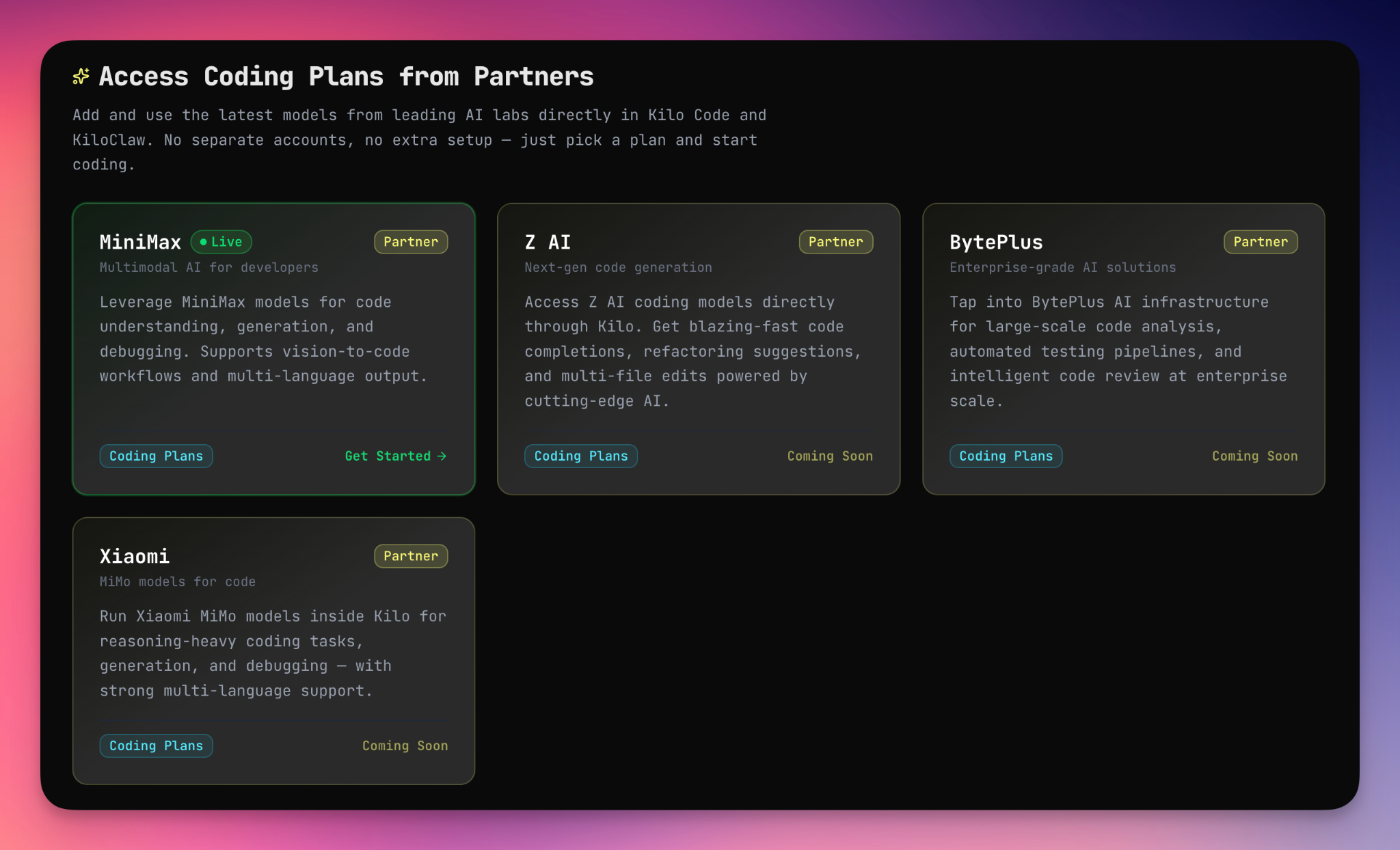
Bring 18+ provider keys via the gateway
Beyond named subscriptions, you can bring your DeepSeek, MiniMax, z.ai, and 16+ other provider API keys directly into the Kilo Gateway and unlock additional benefits. Reach for each provider where it shines, and reach for the rest of your stack when the task calls for it — all on one transparent balance.
Make a good deal a great deal with Kilo Pass
Kilo Pass is separate from a coding plan, and the two are better together. Pass tops up your balance on a recurring basis — but the part that matters is the bonus credits on top, so more money lands on your balance than you actually pay.
That bonus grows over time: up to 40% extra on monthly plans and 50% on annual. On an annual plan, $228 paid becomes $342 of usable balance — every month.
So pair them. A coding plan covers the heavy lifting; Kilo Pass quietly stacks extra credits on your balance every month — credits that aren't locked to one model or one plan. Spend the surplus on pay-as-you-go across the gateway, top up another coding plan, or both.
You can also buy coding plans with your Kilo credits even if you aren't on a Kilo Pass plan — Pass just adds the extra savings. See the tiers and the full math at kilo.ai/pricing/kilo-pass.
Which subscription is best for coding? A quick comparison
| Approach | Model choice | Cost transparency | Lock-in | Reuse what you pay for |
|---|---|---|---|---|
| Single-vendor subscription (one lab) | One lab's models | Vague limits / credits | High | No |
| Per-tool subscription (editor-locked) | Vendor-curated set | Metered, opaque | High | No |
| Kilo balance + gateway | 500+ models, Auto Model routing | Per-model, open source | Low | Yes — BYOK + direct coding plans |
Pricing and limits change frequently. Confirm current tiers with each vendor.
So, which one should you choose?
- If you want one model and the simplest possible bill: a single-vendor subscription works — accept the lock-in and the rate-limit risk.
- If you already pay for ChatGPT, Grok, or a coding plan: bring them into Kilo so they work inside one agentic workflow instead of siloed tools.
- If you want the most flexible, durable setup: run Kilo's transparent balance with Auto Model, buy a MiniMax coding plan directly, and stack Kilo Pass bonus credits on top. You keep model choice, cost visibility, and the freedom to move when the next pricing change lands.
The best AI subscription for coding in 2026 isn't a single plan — it's the setup that survives the next one. Kilo is built to outlast the churn: open source, model-agnostic, and designed to make every subscription you already have more useful.
You can get started with Kilo for free and add a coding plan or your existing keys whenever you're ready.
FAQ
Which AI subscription is best for coding in 2026?
There's no single winner, because the best setup depends on whether you value model choice and cost control or maximum simplicity. A single-vendor subscription (ChatGPT, Claude, Copilot) is simplest but locks you to one lab and its shifting limits. Kilo's transparent balance gives you 500+ models, open-source cost visibility, optional Auto Model routing, and the ability to bring subscriptions and coding plans you already pay for into one workflow.
Can I use my ChatGPT subscription for coding in Kilo?
Yes. Kilo supports connecting your ChatGPT Plus/Pro subscription via a one-click OAuth flow, giving you flat-rate access to OpenAI's Codex coding models (GPT-5.5, GPT-5.3-Codex, and more) inside VS Code and JetBrains with no extra per-token charges. See use your ChatGPT subscription in Kilo.
Can I use my Grok subscription in Kilo?
Yes. You can bring your xAI Grok subscription into Kilo and use Grok's coding models alongside the other 500+ models in the gateway. See Grok in Kilo Code.
Can I buy a coding plan directly in Kilo?
Yes. Coding plans are available directly in Kilo, bought with the credits already on your balance — no separate BYOK wrangling. The launch plan is the MiniMax Token Plan Plus at $20/month, with more coming. Browse them at the Kilo Marketplace.
What is Kilo Pass and how does it give me free tokens?
Kilo Pass is a recurring top-up that adds bonus credits on top of what you pay — up to 40% extra on monthly plans and 50% on annual. Those bonus credits land on your balance every month and aren't locked to any single model or plan, so you can spend them on pay-as-you-go usage or coding plans across the gateway.
Which API keys can I bring into the Kilo Gateway?
You can bring DeepSeek, MiniMax, z.ai, and 16+ other provider API keys directly into the Kilo Gateway via BYOK, and run them on one transparent balance alongside the rest of the 500+ models.
Is Kilo open source, and why does that matter for a coding subscription?
Yes, Kilo is open source. It means you can always see which models are being used, get granular per-model cost insight rather than an opaque credits meter, audit the code, and self-host with local models for compliance — none of which single-vendor subscriptions offer.