
You trust an AI coding assistant to write, refactor, and commit core repository logic. But your calendar and inbox? Those stay manual chaos zones.
Tasks like inbox triage, drafting contextual replies, schedule negotiation, and meeting note routing aren't batch jobs. They're continuous, event-driven workflows that need an always-on runtime. And these are the biggest time costs for a founder.
This guide helps you apply the same autonomous agent approach to your operations, communications, and scheduling.
By the end, you will have a hands-on, secure path to deploy OpenClaw to handle your administrative workloads without compromising sensitive data, exposing critical systems, or turning you into a part-time infrastructure engineer.
Executive summary: Recommended OpenClaw setup
Quick verdict: OpenClaw's always-on agent architecture is the right fit for founder inbox and calendar workflows. Run it on a managed runtime if you want the privacy and customization of OpenClaw without the operational overhead of hosting it yourself.
What it enables: You can automate inbox triage, draft contextual replies, negotiate meeting times, and manage follow-ups without manual intervention. Total running costs typically fall below what SaaS scheduling tools charge ($15 to $50 per user per month), while covering a much broader set of workflows. A detailed cost breakdown follows the comparison table.
The recommended production stack needs three core components:
- Managed runtime: a managed OpenClaw host gives you secure infrastructure and continuous uptime, and handles the complex, error-prone parts of agent deployment.
- Layered authorization: runtime constraints (tool allow-listing, approval gates, activity logs) control what the agent can do inside your workspace, not OAuth scopes alone.
- Human-in-the-loop approval gates: Route all outbound actions through Slack or Telegram so you have final approval before any email goes out or meeting gets confirmed.
Why a managed runtime beats self-hosting for lean teams: Self-hosting is viable for teams with DevOps bandwidth to manage OAuth token expiry, Pub/Sub watch renewals, and container isolation. For founder-led teams without dedicated ops, a managed runtime absorbs those failure modes, letting you focus on agent logic.
The five founder time sinks that an always-on agent can automate
Startup founders bleed hours into administrative tasks that don't ship product or close revenue. According to Microsoft’s 2025 Work Trend Index, the average worker receives 117 emails daily and is interrupted every two minutes by a meeting, email, or notification. On top of that, professionals [waste up to four hours per week just on scheduling meetings].(https://www.businesswire.com/news/home/20231108601722/en/Report-Calendly%E2%80%99s-State-of-Scheduling-2023-Shows-AI-Intrigue-as-Productive-Meetings-Deemed-Essential/)
For a founder, this shows up in five continuous jobs:
- Inbox triage: categorizing and archiving incoming messages.
- Draft replies: writing contextual responses to investors, partners, and customers.
- Calendar scheduling: resolving back-and-forth on time zones and availability.
- Follow-up chase: monitoring outbound messages and pinging unresponsive recipients.
- Meeting note routing: extracting insights and pushing them to the correct task tracker.
These tasks share characteristics that make them hard to automate with conventional scripts. They require deep access to your private data context, adherence to dynamic business rules, and a constant, round-the-clock event loop.
Ad-hoc prompts pasted into standard chat interfaces don't cut it here. Standard web interfaces lack event-driven triggers, so they can't wake up autonomously when a new email arrives or a calendar invite shifts. And they lack persistent memory of your evolving priorities.
Dedicated scheduling software like Motion and Reclaim solves a slice of this by enforcing deterministic calendar rules. They're plug-and-play and work for teams willing to accept vendor-specific rule engines and vendor-managed OAuth. They don't address inbox triage, draft replies, follow-up chases, or meeting note routing, and they don't compose across Gmail, Slack, and internal systems the way an agent does.
Should you self-host OpenClaw or use a managed runtime?
When adopting OpenClaw, the architectural decision is how you'll deploy it.
Founders evaluating this typically choose between three deployment models: a managed OpenClaw service, a do-it-yourself self-hosted approach on a virtual private server, or a managed VPS environment.
| Criteria | Managed OpenClaw runtime | Self-hosted (DIY on a VPS) | Managed VPS |
|---|---|---|---|
| Total cost of ownership | Flat subscription plus direct API costs for model usage. Zero hidden engineering hours. See the cost estimate below the table. | Server costs plus 10-20 hours monthly for updates and infrastructure maintenance. | Higher server costs plus ongoing manual application-level maintenance. |
| Setup complexity | One-click deployment. Pre-configured OAuth and automated webhook renewals. | High. Requires manual Docker setup, environment configuration, and SSL management. | Medium. Server is managed, but application state and API routing remain manual. |
| Security & isolation model | Sandboxed VMs, strict tool allow-listing, encrypted credential vaults. | You are responsible for container isolation and securing host access. | Relies on provider infrastructure, but internal agent permissions remain unmanaged. |
| Built-in approval workflows | Native human-in-the-loop features are configurable via the dashboard. | Requires building custom interception scripts and webhook handlers from scratch. | Requires building custom interception scripts and webhook handlers from scratch. |
| Model flexibility | Model switching behind a single gateway, or BYOK across providers. | Requires managing individual API keys and balancing provider rate limits. | Requires managing individual API keys and balancing provider rate limits. |
Estimating your monthly model cost
The "total cost of ownership" row above combines many assumptions into a single number. Here is what that number actually looks like for a typical founder workload.
For a founder processing roughly 200 inbound emails and 10 meeting requests per day, expect $1 to $25 per month in model costs on top of your hosting subscription. The low end assumes routing bulk triage to a fast model like Claude Haiku. The high end assumes premium models like Claude Sonnet for every draft and triage pass. Most founders settle on $5 to $10 per month using a tiered model: lightweight models for triage, labeling, and archival decisions, and premium models reserved for drafts to investors, customers, and partners.
For comparison, dedicated SaaS scheduling tools alone charge $15 to $50 per user per month and cover a narrower slice of the workflow. Self-hosted OpenClaw eliminates the platform fee entirely but replaces it with 10 to 20 hours of monthly operational work, which, at any reasonable founder's hourly rate, is the most expensive option of the three.
Self-hosting OpenClaw is the right call when you already run production infrastructure, want full control over the stack, and have the bandwidth to manage OAuth rotation, Pub/Sub watch renewals, and container isolation. For technical founders running lean teams focused on product and go-to-market, the operational overhead usually costs more time than it saves. This is where a managed runtime fits.
In this scenario, the biggest operational risk for self-hosters is the integration with Google Workspace.
If you self-host and leave your Google OAuth application in the default testing mode, your refresh tokens will silently expire every seven days. Token expiration instantly breaks all inbox automations until you manually re-authenticate. Google also limits OAuth refresh tokens to 100 per user per client.
Real-time email processing creates another severe maintenance burden. To avoid expensive polling, OpenClaw uses Google Cloud Pub/Sub for push notifications. The Gmail API requires you to manually renew the Pub/Sub watch call at least once every seven days.
If a self-hosted instance fails to renew this call because of a temporary network issue or a crashed cron job, inbound email processing stops silently, and you won't get an alert. A managed runtime abstracts this lifecycle, handling continuous token health and watch renewals in the background.
How to secure your OpenClaw agent
Technical founders hesitate on operational agents because the risks are real. A hallucinated client email, leaked financial data, or a catastrophically deleted inbox can all result from a misconfigured agent.
A security-first runtime addresses this at the infrastructure layer: no SSH access into the agent environment, dedicated virtual machines with persistent encrypted storage, and strict tenant isolation.
Strict tool allow-listing should be the default, so the agent can't execute arbitrary bash commands or reach the wider internet unless you explicitly grant permission. A secrets manager such as 1Password keeps credentials out of plain text, injecting them only at runtime.
Most Google Workspace connections request the full set of permissions needed to cover inbox, calendar, and drafting workflows in a single OAuth flow. That keeps setup fast, but it also means the grant itself is broad. The security model therefore depends on runtime constraints rather than OAuth scoping to prevent misuse:
- Tool allow-listing blocks the agent from calling Gmail or Calendar methods you have not explicitly enabled, even though the underlying OAuth token would permit them.
- Human-in-the-loop approval gates require your explicit sign-off before any outbound or destructive action, such as sending a message, confirming a meeting, or deleting a thread.
- Activity logs record every tool call the agent attempted, with timestamps and payloads, so you can audit behavior after the fact.
- Instant revocation from your runtime's dashboard or directly from your Google Account security page cuts the agent off from your data immediately.
For tighter permission boundaries, route Google Workspace access through a scoped plugin or integration layer. OAuth is a blunt instrument. Even gmail.compose lets the agent read and write every draft in your mailbox.
A plugin or MCP server placed between the agent and Google's APIs exposes only the operations you want, such as "draft replies on threads labeled Investor Relations" or "create events on your Work calendar only." That shrinks the permission surface below what any OAuth scope can enforce, and gives you a single choke point for logging, rate limits, and revocation.
How to set up meeting scheduling and calendar management
Follow these steps to ensure your agent operates predictably, respects your time constraints, and never commits to a meeting without your authorization.
Step 1: Connect Google Workspace and Telegram
In your runtime's settings, connect your Google account. The safest flow is a local OAuth handshake: you run a short command in your own terminal, complete the authorization on-screen, and your tokens are generated and stored in the platform's encrypted vault instead of being passed around through browser redirects.
Next, authenticate your preferred notification channel (Telegram or Slack) from the same settings menu. This establishes the communication tunnel the agent uses to ping you for approvals.
Step 2: Write your scheduling rules (agent prompt)
The agent needs explicit, natural language rules to govern your schedule. Unlike rigid software, you can define nuanced priority tiers. Open your agent's core instruction file and define your parameters clearly.
A well-configured prompt should look something like this:
You are my executive scheduling assistant. You have read and write access to my Google Calendar. Adhere strictly to the following rules. Always ensure a 15-minute buffer between any scheduled events. Internal team meetings should only be scheduled between 1:00 PM and 4:00 PM on Tuesdays and Thursdays. Sales pitches must be restricted to Friday mornings. If a recognized investor requests a meeting, prioritize them immediately and offer slots for the very next day, overriding standard focus blocks if necessary. Do not double-book.
You can extend the same prompt to govern inbox behavior. Add rules for which senders get auto-archived, which labels apply to board and investor correspondence, and which keywords trigger an urgent Telegram ping. Treat the prompt as a living document and update it as your priorities shift.
Step 3: Enable human-in-the-loop approval
An autonomous agent should never blindly send an outbound scheduling confirmation. Configure a human-in-the-loop approval gate in your runtime's default permissions, choosing the "ask for permission" behavior rather than autonomous execution. This ensures the bot pauses and requests your explicit authorization before executing any tool or sending an email.
The approval gate only fires on outbound, irreversible actions such as sending an email, confirming a meeting, or deleting a thread. Non-committal actions like writing a Gmail draft, applying a label, or posting a summary to Slack run automatically, since you can still review or undo them afterward. Most runtimes let you tune this per-tool if you want tighter or looser guardrails.
Step 4: Delegate tasks to your agent via Telegram or Slack
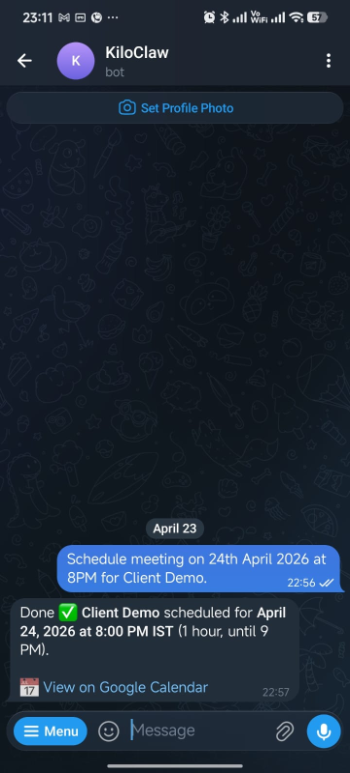
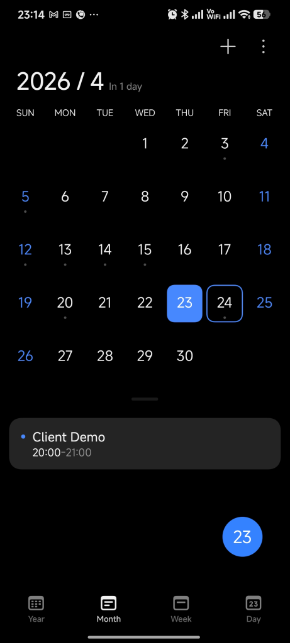
Once the setup steps above are complete, your agent runs continuously in the background. It will reach out proactively when it needs your input, for example, to approve an outbound email or confirm a meeting slot. You can also message the agent directly at any time to hand off a task. Send a Telegram message like "Schedule a Client Demo on April 24th at 8:00 PM" and the agent will check your calendar against your scheduling rules and send an invite. The screenshots below show this flow end to end.
Delegate a meeting to your agent in one Telegram message.
The meeting lands on your calendar with attendees, time, and invite details already filled in.
What your agent handles once it is running
With the agent live, here is how it handles the other daily time sinks without you needing to prompt it each time.
Inbox triage: Labels, archiving, and escalation alerts
You can instruct your agent to triage incoming mail based on dynamic event triggers.
Configure the agent to automatically archive recognized vendor newsletters, mark automated system alerts as read, and apply specific Google Workspace labels to correspondence from your board members.
For critical escalations, such as an email from a key enterprise client containing the words "urgent" or "outage," the agent can bypass standard labeling and instantly send a high-priority ping to your phone via Telegram.
Draft replies: Generate contextual responses without auto-sending
When a standard email requires a personal response, the agent acts as your ghostwriter. Because it runs continuously, it can read the entire historical thread context.
Using integrated search tools, the agent can run a query through Brave search to pull recent company news regarding the sender or securely query your internal Google Drive to reference a specific contract clause.
The agent synthesizes this information and generates a highly contextual, accurate reply. Instead of sending automatically, the agent places the response directly into your Gmail Drafts folder. You can open your email client over coffee, review the pre-written drafts, make minor tonal adjustments, and hit send.
Follow-ups: Detect stalled threads and draft bump emails
You lose critical momentum when you forget to follow up on unreplied emails. An always-on agent eliminates this by executing continuous cron-style workflows.
Configure the runtime to scan your sent folder every night at midnight. The agent analyzes outbound emails seeking specific linguistic markers indicating you requested a response or action, then cross-references these threads to ensure no reply has been received within a defined window, such as three business days.
By 8:00 AM, the agent pushes a concise summary to your Slack workspace detailing exactly which high-priority threads are stalling. The message includes direct links to the emails and pre-drafted bump messages, allowing you to re-engage investors or prospects with a single click.
Meeting notes: Extract action items and route them to your task tracker
Connect a meeting transcription source (Granola, Otter, Fathom, or Google Meet captions) as an agent tool. After each meeting, the agent parses the transcript for action items, tags them by owner, and pushes them into your task tracker of choice, such as Linear, Asana, or Notion, along with the meeting title and a link to the source transcript. For sensitive conversations like board meetings or exec 1:1s, scope the agent to write a summary into a designated Google Doc instead of auto-routing.
OpenClaw inbox and calendar FAQ
How do I ensure OpenClaw never sends an email without my approval?
Require a human-in-the-loop approval step via Slack or Telegram before any outbound action. Configure workflows so the agent only drafts messages and pauses until you approve the send.
What Google Workspace OAuth scopes should I use for inbox and calendar automation?
Most managed runtimes request the scopes needed to run inbox, calendar, and drafting workflows in a single OAuth flow, and runtime controls (tool allow-listing, approval gates, activity logs) constrain what the agent can actually do. For tighter boundaries, route access through a scoped plugin or MCP server that exposes only the operations you want. See the security section for details.
What operational upkeep does self-hosted OpenClaw need for Gmail?
Self-hosted OpenClaw needs OAuth refresh token rotation, commonly every 7 days in testing mode, and Pub/Sub "watch" renewals on a schedule. If you have DevOps bandwidth, you can manage these yourself. If you don’t, a managed runtime continuously handles token health and watch renewals, so you never have to think about it.
Can I run inbox triage, drafting, and scheduling in one agent?
Yes. An always-on runtime can handle multiple event-driven workflows, including new email, meeting requests, and follow-up checks using the same tool connections and rules.
How long does it take to set up OpenClaw on a managed runtime?
Typically under 5 minutes. Connect Google Workspace + Slack or Telegram, set scopes, add your scheduling rules, and enable approval gates. Most complexity comes from OAuth/webhook upkeep, which the managed runtime abstracts.
Is OpenClaw SOC 2 or GDPR compliant?
Compliance depends on your configuration and vendor agreements. Use enterprise or zero-retention settings where available, sign the appropriate DPAs, and ensure that scopes, logging, and data handling align with your compliance requirements.
Can I switch LLMs later without rebuilding my workflows?
Yes, if your runtime supports multiple models behind a gateway. With a gateway in front of your providers, you change the model configuration in one place while keeping the same integrations, rules, and approval steps intact.
How much does it cost to run these automations (beyond the platform fee)?
Model costs scale with volume and model choice. A typical founder workload of 200 emails and 10 meeting requests per day runs $1 to $25 per month, with most users settling around $5 to $10 through model tiering. See the "Estimating your monthly model cost" section above for the full assumptions and comparison to SaaS scheduling tools.
Conclusion: Deploy an always-on OpenClaw agent without self-hosting overhead
A founder's time is the most expensive and constrained resource in any startup. Solving the continuous, heavy burden of administrative tasks takes more than a calendar application with a slightly better UI. You need an autonomous, event-driven architecture capable of reasoning through complex, ambiguous operational realities around the clock.
The core OpenClaw engine is open source and freely available. For founders without dedicated ops, the infrastructure tax of self-hosting (rotating tokens, renewing Pub/Sub watches, debugging container networks) often costs more time than it saves. If you have the DevOps bandwidth, run it yourself. Otherwise, a managed runtime is the better call.