
The short version
# 1. Install the surfaces you use
npm install -g @kilocode/cli
code --install-extension kilocode.Kilo-Code
# JetBrains: Settings -> Plugins -> Marketplace -> "Kilo Code"

# 2. Authenticate. Do not reuse Claude Code credentials.
kilo auth login
kilo config check

# 3. Pull a Claude Code session across, if you want the history
kilo
# /new
# /resume-claude

# 4. Translate config. Paste the migration prompt below into Kilo and let it do the work.

# 5. Verify
kilo debug config
kilo agent list
kilo debug skill
kilo mcp list
Two things carry over with no manual work: Claude Code session transcripts, via /resume-claude, and skills, because Kilo reads .claude/skills/ as a compatibility directory.
Everything else is a translation. CLAUDE.md, subagents, MCP servers, permissions, and commands all have Kilo equivalents with a different shape. Hooks, auto memory, and path-scoped rules do not have equivalents at all. Those sections explain what you lose and what to do instead.
Plan 45 to 90 minutes for one repository if you have subagents and MCP servers.
Let Kilo do the migration
Paste the prompt below into a fresh Kilo session with the repository open. It inventories your Claude Code config, reports what it finds, asks about decisions it cannot make, and writes nothing until you approve.
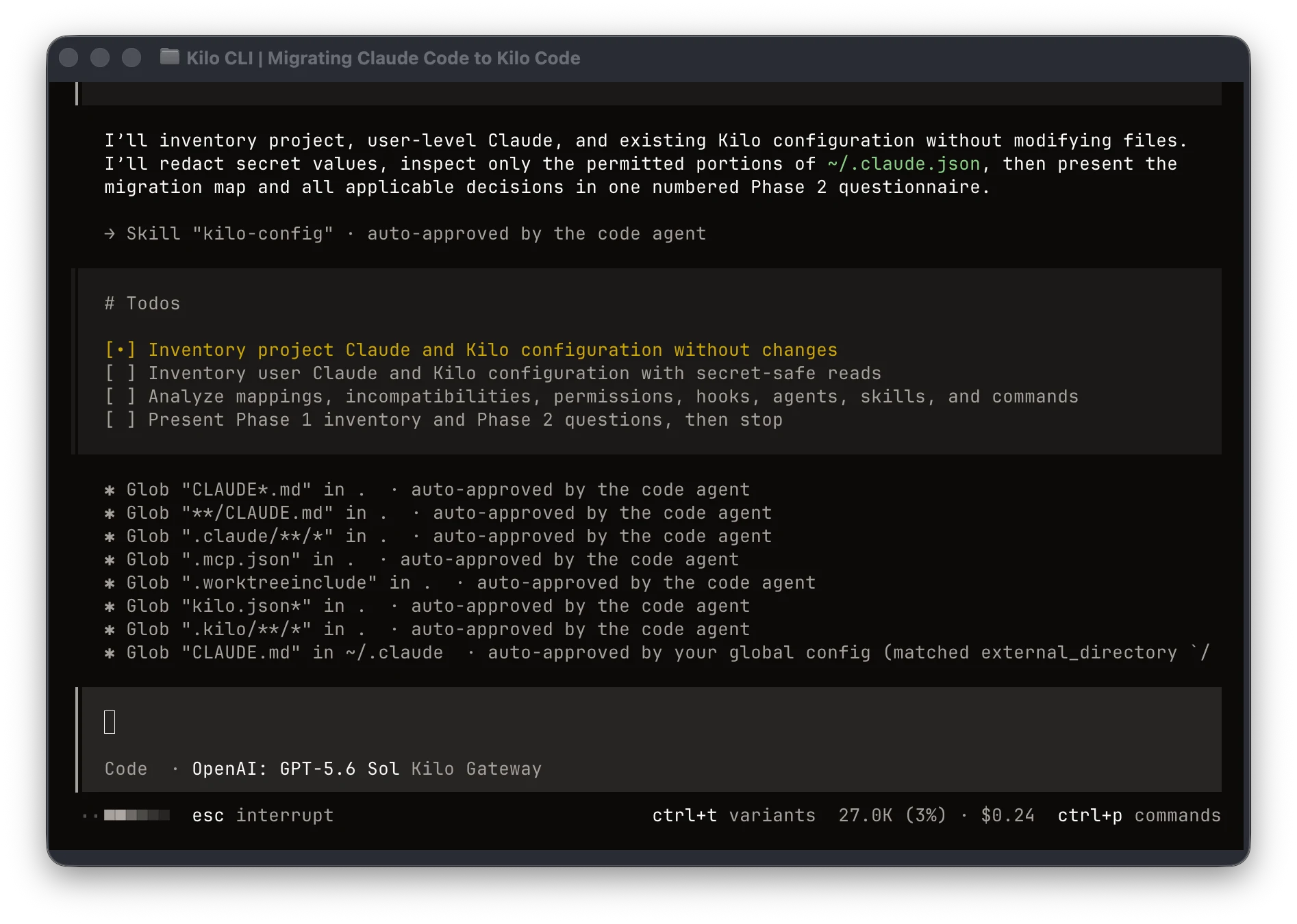
You are migrating this project from Claude Code to Kilo Code. Work in three phases.
Do not skip phase 2. Do not write any file before I approve the plan.

## Ground rules

- Read-only until I approve. Phase 1 and 2 are inventory and questions only.
- Never delete, move, or edit anything under `.claude/`, `~/.claude/`, `~/.claude.json`,
  or `CLAUDE.md`. Copy and translate, never cut.
- Never copy credentials. If you find API keys, OAuth tokens, or secrets in
  `~/.claude.json`, `.claude/settings*.json`, `.mcp.json`, or anywhere else, do not
  carry them into Kilo config and do not print them. Just note that the server or
  provider needs re-authentication.
- Never put a secret in a Kilo config file. Use `{env:VAR_NAME}` references, and tell
  me which environment variables I need to set.
- If a Claude Code feature has no Kilo equivalent, say so plainly and list it in an
  unmigrated section. Don't approximate it silently.
- Use the real Kilo schema. If you're unsure of a key, check the `$schema` at
  https://app.kilo.ai/config.json rather than guessing.

## Phase 1 - Inventory (read only)

Read whichever of these exist. Report which were found and which were absent.

Project scope, relative to the repo root:
  CLAUDE.md
  CLAUDE.local.md
  .claude/CLAUDE.md
  .claude/settings.json
  .claude/settings.local.json
  .claude/rules/**/*.md
  .claude/agents/**/*.md
  .claude/skills/*/SKILL.md          (and any bundled files in those skill dirs)
  .claude/commands/**/*.md
  .claude/output-styles/*.md
  .claude/hooks/**
  .claude/workflows/*.js
  .mcp.json
  .worktreeinclude
  Any CLAUDE.md files in subdirectories

User scope, in my home directory:
  ~/.claude/CLAUDE.md
  ~/.claude/settings.json
  ~/.claude/rules/**/*.md
  ~/.claude/agents/**/*.md
  ~/.claude/skills/*/SKILL.md
  ~/.claude/commands/**/*.md
  ~/.claude/output-styles/*.md
  ~/.claude.json                     (read the mcpServers key and the settings-shaped
                                      keys only - ignore transcripts, caches, and the
                                      OAuth session)

Also read anything that already exists on the Kilo side so you don't clobber it:
  kilo.jsonc, kilo.json, .kilo/kilo.jsonc, .kilo/kilo.json
  .kilo/agents/, .kilo/commands/, .kilo/skills/, .kilo/rules/
  ~/.config/kilo/kilo.jsonc and the same subdirectories there

Then print an inventory table: source file, what it contains in one line, and the
Kilo destination you propose. Flag every item you can't map.

## Phase 2 - Ask me these, then stop

Ask all of the questions below that apply, numbered, in one message. Give me your
recommended default for each so I can reply "defaults except 4 and 7". Then wait.

1. SCOPE. Migrate this repo only, or this repo plus my user-level `~/.claude/`
   config into `~/.config/kilo/`?

2. INSTRUCTIONS. Kilo loads `AGENTS.md` from the project root automatically. It does
   not load `CLAUDE.md` unless I point at it. Which do you want:
   (a) copy CLAUDE.md to AGENTS.md and leave CLAUDE.md in place for Claude Code,
   (b) create AGENTS.md as the source of truth and leave a one-line CLAUDE.md that
       imports it with `@AGENTS.md` so both tools stay in sync,
   (c) leave CLAUDE.md alone and add `"instructions": ["CLAUDE.md"]` to kilo.jsonc.
   Tell me which one keeps both tools working during a parallel-run period.

3. PATH-SCOPED RULES. For each `.claude/rules/*.md` file that has `paths:` frontmatter,
   Kilo has no glob-triggered rule loading. Show me the list of those files with their
   globs, and for each ask whether to:
   (a) load it unconditionally via the `instructions` array in kilo.jsonc,
   (b) convert it to a per-directory `AGENTS.md` in the directory its globs mostly
       cover (Kilo loads those on demand when the agent reads files there),
   (c) convert it to a skill with a description that says when it applies,
   (d) fold it into the root AGENTS.md,
   (e) drop it.
   Rules with no `paths:` frontmatter go into `instructions` - confirm that's fine.

4. SKILLS. Kilo can read `.claude/skills/` as a compatibility directory. Do you want to
   (a) leave the skills where they are and rely on that, or
   (b) copy them into `.kilo/skills/` so they don't depend on the compat path?
   If (a), check whether the compat directory is actually active in my current setup
   before we rely on it - run `kilo debug skill` and show me whether the Claude Code
   skills appear in the list.
   Either way, flag any SKILL.md whose `name` frontmatter doesn't match its directory
   name, and any skill using `disable-model-invocation`, `user-invocable`,
   `allowed-tools`, or `hooks` frontmatter, since Kilo's skill spec doesn't use those.

5. SUBAGENTS - MODELS. List each `.claude/agents/*.md` with its `model:` value. For each,
   should the Kilo agent inherit the session model, or pin a specific one? If pinning,
   run `kilo models anthropic` (and any other provider I use) and show me the exact
   `provider/model-id` strings before you write them, because Claude Code aliases like
   `sonnet` and `opus` are not valid Kilo model IDs.

6. SUBAGENTS - PERMISSIONS. Claude Code agents use `tools:` allowlists and
   `disallowedTools:` denylists. Kilo agents use a `permission` map over
   bash / edit / read / glob / grep / webfetch / task / websearch / todowrite / lsp / skill.
   Show me your proposed translation per agent as a table before writing. For a
   read-only Claude Code agent (`tools: Read, Grep, Glob`), propose `edit: deny` and
   `bash: deny` and let me confirm. Flag any agent using `memory:`, `isolation:`,
   `skills:`, `hooks:`, `maxTurns`, or `permissionMode` and tell me what's lost.

7. PERMISSIONS BASELINE. Two options for the top-level `permission` block:
   (a) strict start - `"*": "ask"` with a small explicit allow list, loosened after
       I've watched it for a few days,
   (b) port my Claude Code allow/deny lists as literally as they translate.
   Whichever I pick, remember Kilo evaluates permission patterns with the LAST matching
   rule winning, so `"*"` goes first and specifics go after. Show me the resulting
   block before writing it. Convert `Read(./.env)`-style deny rules into both a
   `permission.read` deny entry and a `.kilocodeignore` entry, and tell me the
   difference between the two.

8. MCP SERVERS. List every server in `.mcp.json` and in the `mcpServers` key of
   `~/.claude.json`, with transport type. For each, ask: port it or drop it, and
   project-scope or global-scope. Important: `{env:VAR}` references only resolve in
   trusted config - my global `~/.config/kilo/kilo.jsonc` - not in a project-level
   kilo.jsonc. So any server that needs a secret from the environment should go global.
   Say so for each affected server rather than writing a project entry that will
   silently fail to interpolate.

9. HOOKS. For every hook in `.claude/settings.json`, `.claude/settings.local.json`, and
   `~/.claude/settings.json`, print a table: event, matcher, what the command does,
   and my options. Kilo has no shell-command hook system. For each hook ask whether to:
   (a) express it as a Kilo permission rule, if it's a PreToolUse deny gate,
   (b) rewrite it as a Kilo plugin - a TypeScript module in `.kilo/plugin/` using
       `tool.execute.before` / `tool.execute.after` / `chat.message` / `permission.ask`
       / the `event` hook,
   (c) move it into my own git hooks or CI, if it's a formatter or linter,
   (d) drop it.
   Don't write any plugin until I've picked (b) for a specific hook. When I do, write
   one file per hook in `.kilo/plugin/`, and tell me it needs `bun install` support via
   a `.kilo/package.json` if it imports anything.

10. AUTO MEMORY. If `~/.claude/projects/<this project>/memory/MEMORY.md` exists, Kilo has
    no equivalent auto-memory store. Do you want me to read it and propose a short set
    of durable facts to add to AGENTS.md, or leave it alone? If proposing, show me the
    diff - don't append raw memory notes into a file the whole team reads.

11. COMMANDS. `.claude/commands/*.md` map to `.kilo/commands/*.md`, and any
    `.claude/skills/*/SKILL.md` that Claude Code exposes as `/name` maps there too.
    Flag every command that uses `$ARGUMENTS`, `$0`/`$1` positional args, shell
    injection, or `argument-hint`, and tell me which of those Kilo supports in
    commands before we rely on them.

12. OUTPUT STYLES. If `.claude/output-styles/` or `~/.claude/output-styles/` has files,
    propose turning each into either a Kilo primary agent with a custom `prompt`, or an
    entry in `instructions`. Ask which per file.

13. GIT. Should the new `.kilo/` directory and `kilo.jsonc` be committed, and do you
    want `.gitignore` entries for anything personal? Propose the entries; don't write
    them yet.

## Phase 3 - Write, after approval only

Apply exactly what I approved. Nothing else. Then:

- Show me a diff or a file-by-file list of everything you created or changed.
- Run `kilo config check` and paste the output verbatim.
- Run `kilo debug config` and confirm the instructions, mcp, permission, and agent
  keys resolved the way we intended.
- Run `kilo agent list` and confirm every migrated agent appears with the mode and
  permissions we agreed.
- Run `kilo debug skill` and confirm every skill I expect is discoverable.
- If we ported MCP servers, run `kilo mcp list` and tell me which need
  `kilo mcp auth <name>` or an environment variable before they'll connect.

Finish with two lists:

  MIGRATED - one line each, source -> destination.
  NOT MIGRATED - everything with no Kilo equivalent, what it did in Claude Code, and
  what I'd have to build to get it back. Be specific; I'd rather know now.
For user-scope migration, first give Kilo read access to the Claude config directory:
{
  "permission": {
    "external_directory": { "~/.claude/**": "allow" }
  }
}
Run the prompt once per repository. User-scope config only needs migrating once, so choose "this repo only" for later repositories.
After Kilo writes the approved changes, use kilo debug config to inspect the fully resolved configuration, including migrated agents and permission rules.
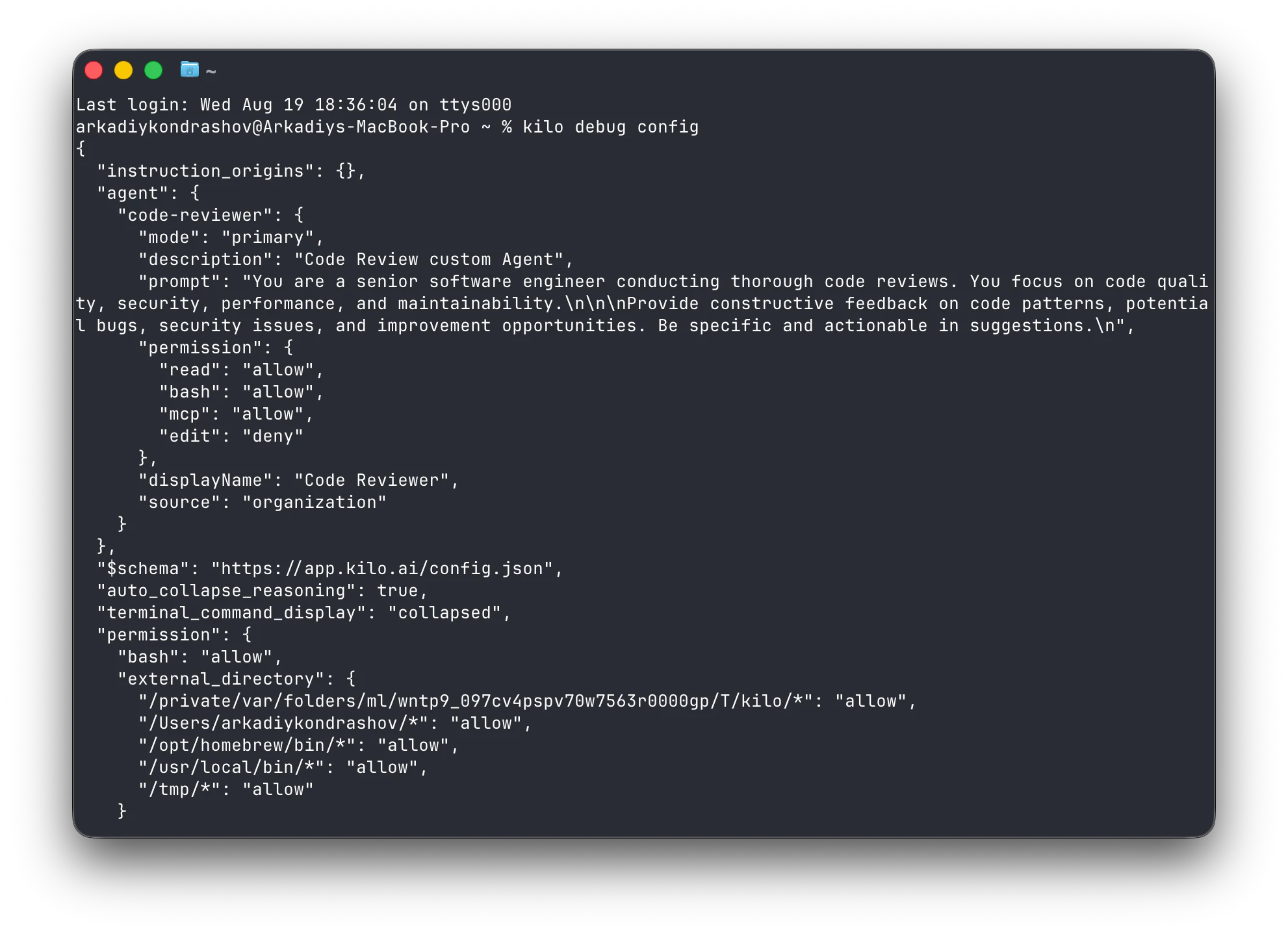
Why teams make this move
The reasons people switch:
Model choice. Claude Code runs Anthropic models. Kilo Gateway fronts 500+ models at zero markup on provider rates, with BYOK if you would rather bill through your own keys, and local models through Ollama or LM Studio.
One config across surfaces. The CLI, the VS Code extension, and the JetBrains plugin read the same kilo.jsonc. Sessions move between them.
Open source. Kilo is MIT-licensed. You can read how prompts, permissions, and tool calls are wired.
If your setup depends on Claude Code hooks, plan mode, or auto memory, read the limitations section before you commit to a date.
What maps, and how
| Claude Code | Kilo | Migration note |
|---|---|---|
| claude CLI | Kilo CLI | npm install -g @kilocode/cli |
| VS Code extension | Kilo Code for VS Code | kilocode.Kilo-Code on the Marketplace |
| JetBrains plugin | Kilo Code v7 for JetBrains | Native Kotlin build, no Node.js required |
CLAUDE.md | AGENTS.md | Rename it, or point instructions at CLAUDE.md |
.claude/rules/*.md | instructions array in kilo.jsonc | Unconditional rules port cleanly; paths:-scoped rules do not |
.claude/agents/*.md | .kilo/agents/*.md | Same file shape, different frontmatter keys |
.claude/skills/*/SKILL.md | .kilo/skills/, or read in place | Kilo loads .claude/skills/ as a compatibility directory |
.claude/commands/*.md | .kilo/commands/*.md | Copy, then check argument syntax |
.mcp.json | mcp key in kilo.jsonc | Different schema; see the MCP section |
permissions.allow / deny / ask | permission map in kilo.jsonc | Arrays become a keyed map; last match wins |
settings.json hooks | Plugins | Shell commands become TypeScript modules |
.claude/output-styles/*.md | Custom agent prompt, or instructions | Kilo has no separate output-style layer |
| Auto memory | No equivalent | Distill durable facts into AGENTS.md |
/code-review | /review | Hosted Code Reviews are also available for GitHub and GitLab |
| Plan mode | plan agent | Switch with Tab in the CLI |
| Subagent delegation | Task tool plus @agent-name | Built-in general and explore subagents ship with Kilo |
--worktree, .worktreeinclude | kilo --worktree <name>, Agent Manager | No per-subagent worktree isolation |
| Session transcripts | /resume-claude | Reads ~/.claude/projects/ directly |
| Claude Code plugins and marketplaces | Kilo plugins, Kilo Marketplace | Different packaging; nothing installs cross-tool |
Where the files live
| Claude Code | Kilo |
|---|---|
CLAUDE.md, .claude/CLAUDE.md | AGENTS.md at project root |
~/.claude/CLAUDE.md | instructions in ~/.config/kilo/kilo.jsonc |
CLAUDE.local.md | A gitignored file referenced from instructions |
.claude/settings.json | kilo.jsonc or .kilo/kilo.jsonc |
.claude/settings.local.json | No separate local tier; global and project only |
~/.claude/settings.json | ~/.config/kilo/kilo.jsonc |
.claude/agents/*.md | .kilo/agents/*.md |
~/.claude/agents/*.md | ~/.config/kilo/agents/*.md |
.claude/skills/<name>/SKILL.md | .kilo/skills/<name>/SKILL.md, or leave it in place |
~/.claude/skills/ | ~/.kilo/skills/ |
.claude/commands/*.md | .kilo/commands/*.md |
~/.claude/commands/*.md | ~/.config/kilo/commands/*.md |
.mcp.json | mcp key in project kilo.jsonc |
mcpServers in ~/.claude.json | mcp key in ~/.config/kilo/kilo.jsonc |
.claude/hooks/* | .kilo/plugin/*.ts |
permissions.deny on Read(...) | permission.read deny rules, plus .kilocodeignore |
~/.claude/projects/<project>/memory/ | No equivalent |
Two path details are worth knowing before you start. Kilo's project config can sit at the repository root as kilo.jsonc or inside .kilo/kilo.jsonc; if both exist, .kilo/ wins. A Kilo agent's name comes from its filename, not from a name field, so .kilo/agents/code-reviewer.md is the code-reviewer agent.
The migration, step by step
1. Install and authenticate
npm install -g @kilocode/cli
kilo --version
For VS Code:
code --install-extension kilocode.Kilo-Code
For JetBrains, install Kilo Code from the Marketplace under Settings -> Plugins. The v7 plugin is a native build and does not need Node.js. If your network blocks runtime downloads, add https://kilo-org.github.io/kilocode/jetbrains/updatePlugins.xml as a custom plugin repository and install the build with Kilo Core bundled.
Then authenticate. Run kilo and use /connect, or run:
kilo auth login
kilo config check
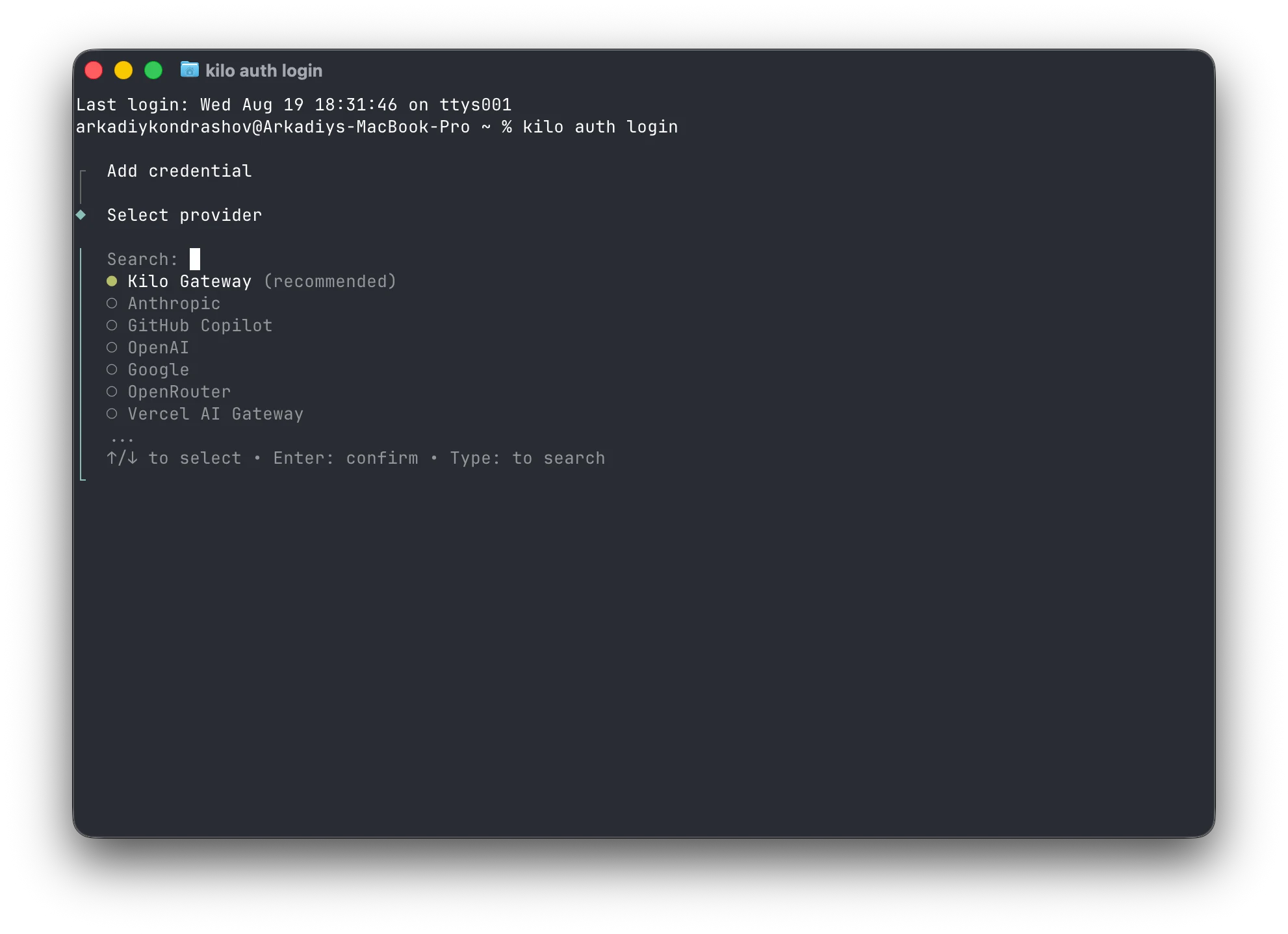
Do not reuse Claude Code credentials. Claude Code's OAuth session and API keys live in ~/.claude.json and your OS keychain, and Kilo does not read them. Pick your provider path first: Kilo Gateway for managed access to 500+ models at zero markup, BYOK for your own provider keys, or a local provider. Kilo Pass adds hosted credits if you want a monthly plan.
2. Bring your sessions across
The Kilo CLI reads Claude Code transcripts from ~/.claude/projects/ and imports them into a Kilo session.
/new
/resume-claude
You get a picker with the 10 most recent sessions for the current directory. To jump straight to one, pass its UUID: /resume-claude <uuid>. The imported history keeps its original order and ends with an import notice. Tool outputs Kilo cannot represent are skipped and counted in that notice.
The import only runs in an empty session, which is why /new comes first.
3. Move instructions to AGENTS.md
Kilo loads AGENTS.md from the project root automatically. It does not load CLAUDE.md. You have three options.
Cutting over. Copy CLAUDE.md to AGENTS.md. Subdirectory AGENTS.md files work like subdirectory CLAUDE.md files: Kilo loads them on demand when the agent reads a file in that directory.
Running both in parallel. Make AGENTS.md the source of truth and reduce CLAUDE.md to an import:
@AGENTS.md
Claude Code expands @path imports at launch, so both tools read the same content.
Leaving CLAUDE.md alone. Point Kilo at it:
{
  "instructions": ["CLAUDE.md", ".claude/rules/*.md"]
}
Rules in .claude/rules/ with no paths: frontmatter port directly into that array. Rules with paths: frontmatter need one of the workarounds in What does not move.
4. Translate subagents
A Claude Code agent:
---
name: code-reviewer
description: Reviews code for quality and best practices
tools: Read, Grep, Glob
model: sonnet
---

You are a senior code reviewer...
The Kilo version at .kilo/agents/code-reviewer.md:
---
description: Reviews code for quality and best practices
mode: subagent
permission:
  edit: deny
  bash: deny
---

You are a senior code reviewer...
Four things changed:
nameis gone. The filename is the agent name.tools:becamepermission:. Claude Code allowlists tools; Kilo setsallow,ask, ordenyper tool. A read-only reviewer isedit: denyplusbash: deny, not a list of tools it may use.mode:is new.primaryagents are in the Tab rotation.subagentagents are only reached through the Task tool or an@mention.allis both and is the default for custom agents.- Model aliases do not transfer.
sonnetandopusare not valid Kilo model IDs. Runkilo models anthropicfor exactprovider/model-idstrings, or omitmodeland inherit the invoking agent's model.
Claude Code frontmatter fields without a Kilo equivalent include memory, isolation, skills preloading, hooks, and permissionMode. maxTurns becomes steps.
5. Move skills and commands
Skills are the easy part. Kilo implements the Agent Skills specification and reads .claude/skills/ as a compatibility directory alongside .kilo/skills/ and .agents/skills/.
kilo debug skill
If your Claude Code skills appear, there is nothing to move. Otherwise, copy them into .kilo/skills/. Check that each skill's name matches its parent directory. Claude Code's disable-model-invocation, user-invocable, argument-hint, and skill-level hooks are not part of the Agent Skills spec Kilo implements.
Move commands from .claude/commands/*.md to .kilo/commands/*.md, or to ~/.config/kilo/commands/ for global commands. Test commands that rely on $ARGUMENTS, positional $1, or shell injection before relying on them.
6. Recreate MCP servers
Claude Code:
{
  "mcpServers": {
    "notion": {
      "command": "npx",
      "args": ["-y", "@notionhq/notion-mcp-server"],
      "env": { "NOTION_TOKEN": "${NOTION_TOKEN}" }
    }
  }
}
Kilo:
{
  "mcp": {
    "notion": {
      "type": "local",
      "command": ["npx", "-y", "@notionhq/notion-mcp-server"],
      "environment": { "NOTION_TOKEN": "{env:NOTION_TOKEN}" },
      "enabled": true
    }
  }
}
The key changes are: mcp replaces mcpServers; command and args collapse into one array; env becomes environment; and ${VAR} becomes {env:VAR}.
{env:VAR} only resolves in trusted config: global ~/.config/kilo/kilo.jsonc, config passed through KILO_CONFIG, or organization-managed config. Project-level config cannot interpolate it. Put any server that needs a secret in global config.
Remote servers use type: "remote" with a url, support OAuth 2.0, and try Streamable HTTP before falling back to SSE. Re-authenticate with kilo mcp auth <name>, then verify with kilo mcp list.
7. Rebuild permissions
Claude Code uses three arrays. Kilo uses one keyed map.
{
  "permissions": {
    "allow": ["Bash(npm test *)", "Bash(git diff *)"],
    "deny": ["Bash(rm -rf *)", "Read(./.env)"]
  }
}
{
  "$schema": "https://app.kilo.ai/config.json",
  "permission": {
    "*": "ask",
    "bash": {
      "*": "ask",
      "npm test*": "allow",
      "git diff*": "allow",
      "rm *": "deny"
    },
    "edit": {
      "*": "ask",
      ".env*": "deny"
    }
  }
}
Kilo evaluates permission patterns last match wins, so the catch-all goes first and specific rules follow it. Kilo also has external_directory rules for paths outside the directory where it started. For files that should be invisible rather than merely unwritable, use .kilocodeignore.
8. Turn hooks into plugins
There is no shell-command hook system in Kilo. Claude Code hooks are JSON entries that spawn scripts, call endpoints or MCP tools, or ask a model. Kilo's extension point is plugins: TypeScript or JavaScript modules in .kilo/plugin/ or ~/.config/kilo/plugin/.
| Claude Code hook event | Kilo plugin hook |
|---|---|
PreToolUse | tool.execute.before |
PostToolUse | tool.execute.after |
UserPromptSubmit | chat.message |
PermissionRequest | permission.ask |
Stop | event, on session.idle |
PreCompact | experimental.session.compacting |
SessionStart | Plugin function body, which runs at load |
UserPromptExpansion | command.execute.before |
A PreToolUse deny gate looks like this:
// .kilo/plugin/env-guard.ts
import type { Plugin } from '@kilocode/plugin';

const EnvGuard: Plugin = async () => ({
  'tool.execute.before': async (input, output) => {
    if (input.tool === 'read' && String(output.args.filePath).includes('.env')) {
      throw new Error('reading .env files is blocked');
    }
  },
});

export default { id: 'env-guard', server: EnvGuard };
Before rewriting hooks, sort them into three groups. Formatters and linters usually belong in a Git pre-commit hook or CI. PreToolUse deny gates are often better expressed as Kilo permission rules. Port only the hooks that genuinely need to execute code inside the agent loop.
Notes for each surface
CLI. Global config is at ~/.config/kilo/kilo.jsonc; project config is kilo.jsonc or .kilo/kilo.jsonc. TUI settings live separately in tui.jsonc. kilo run --auto is the non-interactive equivalent of claude -p with permissions pre-approved.
VS Code. The extension reads the same config files as the CLI and adds a settings webview for providers, auto-approve, models, agent behavior, and experimental settings. Sessions are shared with the CLI.
JetBrains. The native v7 plugin supports IntelliJ IDEA, WebStorm, PyCharm, PhpStorm, GoLand, Rider, CLion, RubyMine, and DataGrip. It reads the same kilo.jsonc. Settings -> Tools -> Kilo Code covers auto-approve, context, and skills.
What does not move
Read this section before you pick a cutover date.
Hooks. Kilo has no shell-command, HTTP, MCP-tool, prompt, or agent hook types. Plugins are the answer, and they are a rewrite. Convert policy gates to permission rules where possible.
Path-scoped rules. Kilo's instructions array has no conditional loading. Per-directory AGENTS.md files cover directory-shaped cases, but there is no equivalent for a rule scoped to **/*.test.ts across the tree. Load it globally or convert it to a skill.
Auto memory. Kilo has no equivalent to Claude Code's ~/.claude/projects/<project>/memory/. Treat it as source material and move only durable facts into AGENTS.md.
Local settings tier. Kilo has global and project config, but no direct .claude/settings.local.json equivalent. Put personal overrides that should not be committed in global config.
Per-subagent worktree isolation. Kilo has session-level --worktree and Agent Manager worktrees, not per-delegated-subagent isolation.
Subagent memory, skill preloading, and agent-level hooks. Claude Code's memory:, skills:, and hooks: agent fields have no counterpart.
Plugins and marketplaces. Neither tool installs the other's plugins. There is no converter.
Credentials. Nothing carries over. Re-authenticate every provider and OAuth MCP server.
Validate before you uninstall
Run these checks against a real task:
-
kilo config checkis clean -
kilo debug configshows the expectedinstructions,mcp,permission, andagentkeys - A chat task follows an
AGENTS.mdrule - A multi-file agentic edit succeeds
-
kilo agent listshows every migrated agent with the right mode - An
@agent-nameinvocation works - A permission-denied test behaves as intended
-
kilo debug skilllists every expected skill - A skill fires on a real request
-
kilo mcp listshows connected and an MCP tool call succeeds - A
/reviewsucceeds before pushing -
/resume-claudeimports a session you care about - The same config resolves in every surface you use
- Provider costs match your chosen setup
Next steps: install Kilo, read the docs, or compare Kilo Code vs Claude Code side by side.
Sources
Kilo documentation
- Kilo CLI
- CLI command reference
- VS Code extension
- JetBrains plugin
- Settings
- AGENTS.md
- Custom subagents
- Skills
- MCP
- Plugins
- Config schema